
Confluence site administrators
Confluence site administrator
You decide what gets installed, and answer for it afterwards.
This guide is for the person who evaluates, installs and supports ServiceAccord on a Confluence Cloud site, and for whoever answers the security, privacy and procurement questions that come with any new app. It takes you from evaluation, through installation and access, to containment and troubleshooting. It is candid about which evidence you can check yourself and which you have to take from the vendor.
If you only need the one-page summary for a security review, go straight to Facts for your security review.
The screenshots are rendered from the app’s own source code in a local harness, using the same Atlassian design-system components. The Confluence page and dialog around them are simplified, so a live site may differ in detail. See About the screenshots.
What the app is
A free Atlassian Forge app for Confluence Cloud, from ITSM Ltd, called ServiceAccord.
It adds three macros to the editor, and nothing else:
| Macro | What authors see in the macro browser | Configuration dialog title |
|---|---|---|
| RACI Matrix | Document who is Responsible, Accountable, Consulted and Informed for a process or service. | Configure RACI matrix |
| Service Review Record | Record a service review with KPIs, RAG status, risks and improvement actions. | Configure service review record |
| Service Level Targets | State agreed response, resolution and availability targets for a service. | Configure service level targets |
All three sit in the macro browser’s structure category (category: structure in the app’s
manifest). Each is a block macro with its own configuration dialog. Authors insert them the way
they insert any macro: while editing a page, type / and search for the name.
The manifest adds no settings pages, admin screens, background jobs, triggers or event listeners, and no integration with Jira or any other product. There is nothing to configure at site level. The only other thing it declares is three export functions, one per macro (when they run).
Before you start
- The Marketplace listing is not published yet. Until it is, installation goes through the vendor (Task 4).
- Support is published; a separate security address is not. Both currently go to the same mailbox (Support).
- The source repository is private. This guide cites files in it so the vendor can be held to them, but your security team cannot open them. See Evidence you can check yourself.
- Several behaviours are verified by design and by automated tests, but not yet on a live site. Each such statement says so.
Task 1 — Evaluate the security posture
Most statements here are structural: they follow from how the app is built, not from a policy someone has to remember. Where one depends on a vendor-side setting the source cannot show, it says so.
What runs, and where
| Part | Where it runs | What it touches |
|---|---|---|
| The rendered macro on a page | The reader’s browser, as UI Kit components inside Confluence. No Forge function runs | The macro’s own stored configuration, which Confluence hands it, and the reader’s locale (used to format dates) |
| The configuration dialog | The author’s browser, inside Confluence’s editor. No Forge function runs | The same stored configuration, read and written through Confluence’s own macro bridge (view.getContext() and view.submit()) |
| The three export functions | Atlassian’s Forge compute (when they run) | The macro’s stored configuration, passed in by Confluence. They return a document fragment and do no I/O |
No part of the app runs on a server of the vendor’s own. The app has no server.
When the export functions run
Once per macro instance each time a page is exported to PDF or Word, and — as documented —
when someone views an older version in page history. Atlassian’s UI Kit tutorial for a plain
Confluence macro,
Change the frontend with UI Kit,
says: “When a Confluence page is exported to PDF or Word, or viewed in the page history, you
can specify how the app should be displayed.” Its page on
rich-text bodied macros
says the same. The handler also accepts a third export type,
other, and returns the same output for all three (the vendor’s decision log).
Documented, but untested for this app, with no test-plan row yet. If history views do go through the export function, as documented, each one runs a function, can write the export log lines described below, and shows the macro’s export form rather than its page form. Every other mention of page history in this guide refers back here.
Scopes, egress and runtime code
- No OAuth scopes. The manifest declares
permissions: scopes: [], the platform’s documented way of requesting none (the vendor’s decision log). The app never calls a Confluence or Jira REST API. - No egress. No
remotesorpermissions.externalin the manifest. Nofetch,XMLHttpRequest,WebSocket,EventSourceorsendBeaconin the app’s own source, and no absolute URL in code that runs. - No third-party fonts, images or CDNs, and every colour is an Atlassian design token. This one is not checked automatically.
The source sweep (test/no-egress.test.ts) checks the first two on every build, including calls
to requestConfluence, requestJira, asApp or asUser. Some of its checks have been
deliberately broken to prove they fail, and the vendor’s internal test plan records
each: an external fetch permission, a scope, fetch() in several disguises, XMLHttpRequest, a
forbidden @forge/api import, a dynamic import() and eval. No mutation is recorded for the
checks on remotes, triggers, Connect modules, Confluence or Jira API calls, or absolute URLs.
Those checks pass, but nobody has recorded watching them fail. The README states the sweep’s
limit: it is a token sweep, so it cannot see through disguised code such as
globalThis['fet' + 'ch'].
Runtime code. Three direct runtime dependencies: react, @forge/react and @forge/bridge.
The sweep checks that the app’s own source imports nothing else. Those packages bring their own
dependencies: @forge/react, for example, depends on lodash, uuid, react-hook-form,
react-reconciler and several @atlaskit packages, and @forge/bridge on iframe-resizer and
@atlaskit/tokens. Whatever is used is bundled into the app’s resources at deploy and runs inside
Atlassian’s UI Kit runtime. The sweep does not inspect those packages. What bounds them is a
platform control: Forge requires an app to declare any external host it contacts in
permissions.external, and this app declares none. Versions are pinned in package-lock.json.
No software bill of materials is published.
Storage and analytics
No Forge KVS or other Forge storage, and no database. Everything an author types is stored in
that macro’s configuration, as one JSON string under a parameter called data, with a
schemaVersion. That configuration is part of the Confluence page, and the single read and write
path (src/shared/config.ts) only ever touches the current macro’s own configuration. There is no
analytics, tracking or telemetry in the source, and the app does not record who viewed or edited
a macro.
What the app logs
A small number of error messages, none of them routine:
- Export functions, to the app’s Forge logs on Atlassian’s infrastructure: the names (not values) of an export payload’s top-level keys when it carries no macro configuration at any known location; and a note, with the parser’s error, when a stored configuration cannot be parsed as JSON.
- Page view and configuration dialog, by default only to the browser’s developer console: a note when a configuration cannot be read, parsed or saved, when the dialog cannot be closed, or when a date cannot be formatted.
A content caveat. When stored text is not valid JSON, the JavaScript parser’s error message can quote a short excerpt of that text, and the app logs that error. So if a macro’s stored configuration were damaged and the page then exported, a fragment of what an author typed could reach the app’s Forge logs. It needs a damaged document to happen at all. The draft Marketplace privacy answers say no macro content is ever logged; this is a narrow exception.
What the source cannot show you. Two Forge features change where messages go. Both are switched on by the vendor outside the source code, so the repository can neither confirm nor rule them out:
- Front-end logs (early access) capture every
console.errorfrom UI Kit front ends, with browser, operating system and user-agent details, and send it to the developer’s logs. For this app that would include the excerpt above on every page view of a damaged macro. - Log export (an early-access point-to-point export, and Atlassian’s documented export APIs) lets a vendor send app logs to its own tools, such as Datadog or Splunk, outside Atlassian.
Both are in the vendor question list.
Your control. Atlassian grants developers access to an installation’s app logs at install time, and a site admin can switch it off. Atlassian’s Access app logs page gives the path as admin.atlassian.com → Apps → your site → Connected apps → the app’s action button → Details → Logs access (admin screens move, so check your own). Atlassian describes the effect as “their logs will no longer appear in the developer console”. It does not say whether that also stops any log export the vendor runs; that is unconfirmed, and a vendor question. The same page carries the sentence “This is only available for paid Atlassian apps.” It sits directly after a paragraph about how a developer contacts the customer, so it most plausibly limits that, not the admin toggle. Confirm the toggle is on your own Connected apps entry (install check, step 5).
Search indexing
Forge lets a macro opt its configuration into Confluence’s search index. Indexing is off unless the manifest turns it on, and this app’s manifest does not. So expect the text inside these macros not to appear in Confluence search results. Not yet checked on a live site. It matters for privacy work too (see the search caveat).
Runs on Atlassian
The app is designed to qualify for Atlassian’s Runs on Atlassian programme. Atlassian applies the badge automatically to eligible Marketplace apps; this one is not listed yet. Atlassian’s Build Runs on Atlassian apps page sets two kinds of requirement:
- No egress and no external hosting. No external resource domains (other than for analytics without in-scope end-user data), remotes, Connect modules, providers or dynamic web triggers. This app declares none of these.
- Storage. Eligible apps “must also do either of the following: use data residency-enabled Forge storage, or store data in Atlassian apps using Atlassian app entity properties.” This app does neither, literally: it stores its data in macro configuration parameters, part of the page. Whether Atlassian treats that as meeting the criterion is unconfirmed.
So eligibility rests on forge eligibility -e production against a real deployment, and that
check has not yet been recorded as run. Until you have its output, treat “designed
to qualify” as a claim you can inspect, not a badge that has been granted. The README’s
Runs on Atlassian section sets out the vendor’s reasoning.
What has not been done
- No third-party penetration test, no CAIQ Lite questionnaire, and no compliance certification (SOC 2, ISO 27001 or similar).
- The vendor-level documents a procurement review usually asks for are not yet published. None of them is published yet. The Marketplace Privacy and Security answers are on the security page.
Evidence you can check yourself
The repository is private and its licence grants no right to copy it. Without it you can see:
- The install consent screen, which should list no data-access scopes for this app (Task 4).
- The app’s entry under Connected apps in Atlassian Administration, once installed.
- The Marketplace Privacy and Security tab, once the listing is published.
- Output the vendor runs against the deployed version rather than the source.
forge version detailslists the version’s egress, analytics, policies, scopes, connect keys, functions, remotes, modules and licence, andforge eligibilitygives the Runs on Atlassian result. Ask for both for the major version you are installing (the-voption; without it the command asks interactively). The exact request is question 5.
Task 2 — Answer privacy and compliance questionnaires
These answers describe the app’s behaviour. Questions about ITSM Ltd as an organisation (its GDPR role, a DPA, its policies) cannot be answered from the code and are still open (What has not been done).
What personal data does the app process? Only what authors type. Fields that invite it include the Service Review Record’s Chair, Attendees and action Owner, and the Service Level Targets’ Owner (“The person or team accountable for this agreement.”). Any free-text field could hold a name. The RACI editor advises “Name the role, not the person”, but cannot enforce it. The app collects nothing about viewers or editors, and reads the viewer’s locale only to format dates.
Where is it stored? In the Confluence page, as part of the macro’s configuration, under your site’s existing Atlassian data residency and controls. The app adds no storage location of its own.
Where is it processed? Storage and processing differ, so answer them separately:
- Viewing and editing happen in the reader’s or author’s browser. No Forge function runs.
- Export runs the app’s export functions on Forge compute (when), and they receive the macro’s content, including any names typed into it. Atlassian’s Forge data residency page says Forge “will aim to execute its invocations from the same location as the host Atlassian app”, and that it “may sometimes execute an app’s invocation from a location other than the location where the host Atlassian app is”. So export processing normally follows your site’s location, but Atlassian does not guarantee it.
- App logs are held by Atlassian. Neither the app’s documentation nor Atlassian’s data residency page states where. Given the content caveat, treat log location as a question for Atlassian and the vendor.
Is it transferred outside the UK or the EEA? The app itself sends data nowhere: it has no egress and no third party. The only processing outside the browser is the export processing on Forge compute described above, which Atlassian operates and aims, but does not guarantee, to run in your site’s location. How your agreement with Atlassian, and the vendor’s terms, cover that processing is a question for Atlassian, the vendor and your data protection officer. Check it against your own agreement with Atlassian when you assess restricted transfers under UK GDPR (or EU GDPR for the EEA).
Is it encrypted, and who can see it? Encryption at rest and in transit is Atlassian’s, on the same terms as the rest of the page. The app adds no masking or pseudonymisation; text is stored as typed, trimmed and capped. Whoever can see the page can see it, subject to the licensed-user rule in Task 5.
How long is it kept, and how do we erase or correct it? As long as the page, or the page version, is kept. The app has no retention period because it has no store, and uninstalling removes nothing from pages. To correct or erase, edit the macro as you would any page text. Earlier values stay in page history until you remove those versions with Confluence’s own tools.
Search caveat for access and erasure requests. Confluence search is expected not to find text inside these macros (Search indexing; not yet checked on a live site). A search for a person’s name may miss a page that names them in a Service Review Record. If you rely on search to answer subject access or erasure requests, account for that.
Does it access tokens, passwords or secrets? It requests no scopes and calls no API, so it has no use for a token, and any token would grant it no data access. Nothing in the source stores or handles authentication material.
Task 3 — Evaluate cost and performance
- Price: free. No licence tiers and no per-user cost.
- An ordinary page view runs no Forge function, however many of these macros a page carries. The macros declare no resolver (the vendor’s decision log). Not yet measured on a page with 20 macro instances.
- Export runs one function per macro instance (when). Atlassian’s macro manifest reference warns that many macro instances “can trigger a large number of invocations in a single export, potentially causing rate limiting and performance issues”. For a large service review pack, that could mean an export that fails or comes out incomplete.
- Storage growth is nil beyond the page itself. The vendor estimates about 9 KB of JSON for a 15-role, 40-activity matrix, and a test checks that case stays under 32 KB. The maximum has not been sized by the vendor. A rough calculation made for this guide puts a RACI matrix at every cap, in plain English text, a little over 32 KB; other scripts take more bytes per character. The other two macros’ maximums have not been sized.
One trade-off to know before rollout: declaring an export function enables Word export, but also replaces Confluence’s own higher-fidelity PDF path with the renderer Word uses, and Forge offers no way to choose per export type. See README Limitations and the vendor’s decision log, which records how the vendor would reverse it.
Task 4 — Install the app
Where things stand today
The Marketplace listing is not yet published. Until it is, the installation link is the only realistic route onto a customer’s site:
- An installation link. The vendor turns on sharing in Atlassian’s developer console and sends you the link. A site admin opens it, chooses the site and product (Confluence), reviews what the app asks for, and approves (Distribute your apps). Once an app has been submitted to the Marketplace, Atlassian no longer allows it to be shared this way, so this route closes when the listing process starts.
- The Forge CLI. Forge logins are personal, so this needs one person who is both a contributor to the vendor’s app and allowed to install apps on the target site. It is how the vendor installs on its own sites, and not realistic for a customer site.
Once the listing is live, expect the normal Marketplace flow: find the app, choose to install it, review what it asks for, and approve, from your app management in Confluence administration or at admin.atlassian.com.
Check the review screen
Whichever route you use, the install screen lists the access the app asks for. For this app it should contain no data-access scopes. If it ever does, stop and ask the vendor why. The README’s Scope justification section is where the reason is meant to be written before a scope is ever added.
Which environment
The vendor keeps development, staging and production environments. Production is the one for real
use. Atlassian’s Environments
page says an app from development or staging carries (DEVELOPMENT) or (STAGING) in its title;
production carries no suffix.
Not verified for this app: Forge records which environment an inserted macro came from. Macros inserted while a development or staging installation was on your site may not render once you switch to production. Treat pages built during a non-production trial as disposable, or test the switch on one page first.
Check the installation
Do this once, on a test page, before you announce the app:
- Edit the page, type
/, and search for RACI, Service Review and Service Level. All three macros should appear. - Insert each one. The configuration dialog opens. Close it without saving. Each macro should show a calm empty state that names it, like the one below.
- Configure one macro, save, publish the page, and check that it renders what you entered.
- Export the page to PDF and to Word. The configured macro should appear as a heading and a table; an unconfigured one as a single plain sentence.
- In Atlassian Administration, open the app’s Connected apps entry and confirm the Logs access setting is there (Your control).
- Open page history and view the version before your change. Record whether the macro shows its page form or its export form (why).
- If you have a guest or anonymous-access space, open a page there as that kind of user (what to expect).

Task 5 — Decide who can use it
- There is no separate app permission. Anyone who can edit a page can insert, configure and remove these macros on it. Any licensed, signed-in user who can view the page can see them.
- Page and space restrictions apply to the macro’s data exactly as to the rest of the page. There is no second store that someone who cannot see the page could read (not yet run).
- Guests and anonymous viewers are not enabled. Forge apps are available only to licensed,
signed-in users of the product unless the manifest opts other user types in (
unlicensedAccess). This manifest does not, so expect guests, and anonymous viewers of a public page, not to see these macros rendered. What they see instead is Confluence’s choice and has not been tested. If customers or suppliers read your service documentation as guests, raise it with the vendor before rollout. Atlassian explains the setting in Access to Forge apps for unlicensed users. - Editing is a desktop job. The configuration dialogs are wider than a phone screen; the rendered macros are responsive. The Confluence mobile app has not been tested.
- Editor type. Forge macros work only in Confluence’s current editor, which Atlassian says all cloud sites use by default. A page still in the legacy editor will not offer them.
- Not tested: how Atlassian Guard data security policies that restrict app access apply to these macros. If you use them, test a page in a governed space first.
Task 6 — Keep it up to date
- The vendor ships new versions. Forge applies minor versions automatically, without admin consent. A new major version waits for an admin to approve the upgrade from app management (App versions). What that means for you is in Security incidents and change control.
- No re-consent is expected. The app requests no scopes and no egress, so an update that keeps it that way should be a minor version. If a future version ever needs a scope, you will be asked to approve it, and the README’s Scope justification should already say why.
- Existing pages keep working across versions. Every read of stored data goes through one function that accepts anything, including documents from older or newer versions, and always returns something it can render. The stored field names are pinned by a test, so a rename that would silently drop saved data fails the build instead.
- Release notes are one file per version in
docs/release-notes/, and the website’s Releases page lists them newest first. The highest version is the version of the app.
Task 7 — Understand the data lifecycle
Macro data is part of the page. Anything Confluence does to a page, it does to the macro’s data too, with no code on the app’s side. The rows that check this on a live site (4.15 to 4.19) are not yet run.
| When this happens | What happens to the macro’s data |
|---|---|
| An author saves the configuration dialog | The data is written into the macro on the page, and saved with the page like any other edit |
| Someone views an older version in page history | The data shown is as it was in that version. It may appear in export form (why) |
| Someone restores an older version | The macro goes back to how it was in that version, along with the rest of the page |
| The page is copied | The copy carries its own independent copy of the data |
| The page is moved to another space | The data moves with it |
| A macro sits in a page template | Pages created from the template start with the template’s data |
| A space is exported, or imported into a site | The data travels inside the page storage. To render, the app must be installed on the destination site |
| A page is deleted, then restored from the trash | The data comes back with the page |
| A page is deleted and purged | The data goes with it. The app kept no copy |
| An author removes the macro from the page | The data is removed with it. Nothing is left over |
| The app is uninstalled | See below |
Uninstalling
The app stores nothing of its own, so there is nothing to delete on the app’s side and no app data to export first. The macro data stays in each page’s storage. While the app is not installed, Confluence shows its own placeholder for a macro whose app is unavailable; that placeholder and its wording are Confluence’s, not the app’s. Reinstalling the same app on the same site should bring the rendered macros back, because the data never left the page. Not yet tested.
Before you uninstall, find out who relies on the macros. The app keeps no list of the pages that use it, and search is not expected to find text inside them, so ask your space owners.
Task 8 — Record accessibility conformance and known limits
The app is built so that colours come from Atlassian design tokens (light and dark themes), status chips always carry a text label, every table has an accessible name, every macro title is a real heading, no two controls in a dialog share a name (“KPI 3 status”, not a fourth “Status”), and destructive actions ask first with focus on the safe choice.
Known limits, imposed by UI Kit and set out in full under README Limitations: tables have no row headers; the scroll area around a wide table cannot be reached by keyboard alone and its region has no name; nothing that appears mid-edit is announced to a screen reader; the app cannot move focus after a row is removed; and a macro’s title is always a level-3 heading, so place the macros under a level-1 or level-2 heading.
Status: no formal conformance report has been produced. The browser audit procedure in the accessibility run-book is written but not yet run. Do not state a WCAG conformance level for this app until it has been.
Security incidents and change control
How a change reaches your site. The vendor deploys to production by hand, with the Forge CLI,
from the main branch after its automated checks — lint, typecheck, tests, dependency and secret
scans, and static analysis — have passed. The vendor’s production deploy script refuses to run
unless the working copy has no uncommitted changes and is at the latest commit on main; an
emergency release from anywhere else needs a stated reason and is recorded. The script cannot stop
somebody who bypasses it, so that part remains the vendor’s release discipline. A Forge minor
version then reaches every production site, yours included, with no consent step and no notice
to you.
What an update cannot do without your approval. Atlassian’s App versions page lists the manifest changes that create a major version, which waits for a site admin’s approval. They include adding or changing scopes, external (egress) permissions and their categories, content permissions, dynamic web triggers, providers, and in most cases remotes. So a minor update cannot give this app API access to your content or let it contact an external host, and in most cases cannot add a remote backend either. That strength applies here because the app’s approved set is empty.
What an update could do without your approval. Change the app’s own code: what the macros show, what they write into a page when an author saves, and what they log (What the app logs).
How to contain it:
- Switch off Logs access (Your control). Atlassian says the site’s logs then no longer appear in the developer console. Whether it also stops any log export is unconfirmed.
- Uninstall the app. Macros show Confluence’s placeholder; the data stays in the pages (Uninstalling).
- Roll back a page with page history if a macro’s content was changed wrongly.
Who tells whom. There is no separate vendor security address today; a security report goes to the published support address, marked as one Until one exists, use the interim route in Support. Do not approve the app for regulated content until you have a named contact for security reports in both directions.
Questions to ask the vendor
The one list of things only the vendor can answer. The rest of the guide points here.
- Who is your security contact, and how do you notify customers of an incident?
- Who can deploy to production, and what stops a deploy from anything other than a reviewed
main? - Have you enrolled in Forge front-end logs, or do you export app logs anywhere (the early-access point-to-point export or Atlassian’s log export APIs)? If so, where do they go? Please confirm in writing.
- If we switch off Logs access for our site, does that also stop any log export you run?
- Please send
forge version details -e production -v <major version>andforge eligibility -e production -v <major version>output for the major version we are installing. - Can we have the source-sweep test and the test-plan mutation record as an extract, or under a non-disclosure agreement?
- Is a software bill of materials available?
- Do you plan to enable guest and anonymous access (
unlicensedAccess)?
Troubleshooting runbook
A macro shows its empty state instead of its content
The page shows a grey box with the macro’s name and an “Edit this macro to…” line. Work through the causes in this order:
-
It is not configured yet, or not enough to count.
- RACI Matrix needs at least one named role and one named activity. A title alone, or roles without activities, still shows the empty state.
- Service Review Record needs any one of: service name, review period, chair, attendees, risks and issues, a review date or next review date, an overall status other than Not set, a KPI with a metric, or an action with a description. The Show RAG legend toggle alone does not count.
- Service Level Targets needs any one of: service name, service hours, support hours, owner, availability target, measurement period, notes and exclusions, a next review date, an agreement type other than the default (SLA), or a target with a priority. The two toggles alone do not count.
Rows left without a name (a role, activity, KPI, action or target) are dropped on save.
-
The stored configuration is damaged. Open the configuration dialog. If it shows “This configuration could not be read”, see the next section. The page shows the empty state in this case, because a published page always renders something rather than an error.
-
The stored configuration is readable but the wrong shape. Valid JSON that does not match what the app expects (for example after a hand edit) parses cleanly. The dialog then opens blank, with a live Save button, and saving overwrites whatever was there. If a macro that used to have content opens blank, do not save. Check page history first and restore the last version where it rendered.
-
The page is still loading. Before Confluence hands the macro its data, it draws nothing at all, not the empty state. A blank space that never fills is a loading or platform problem. Reload, then escalate with the page URL.
“This configuration could not be read”
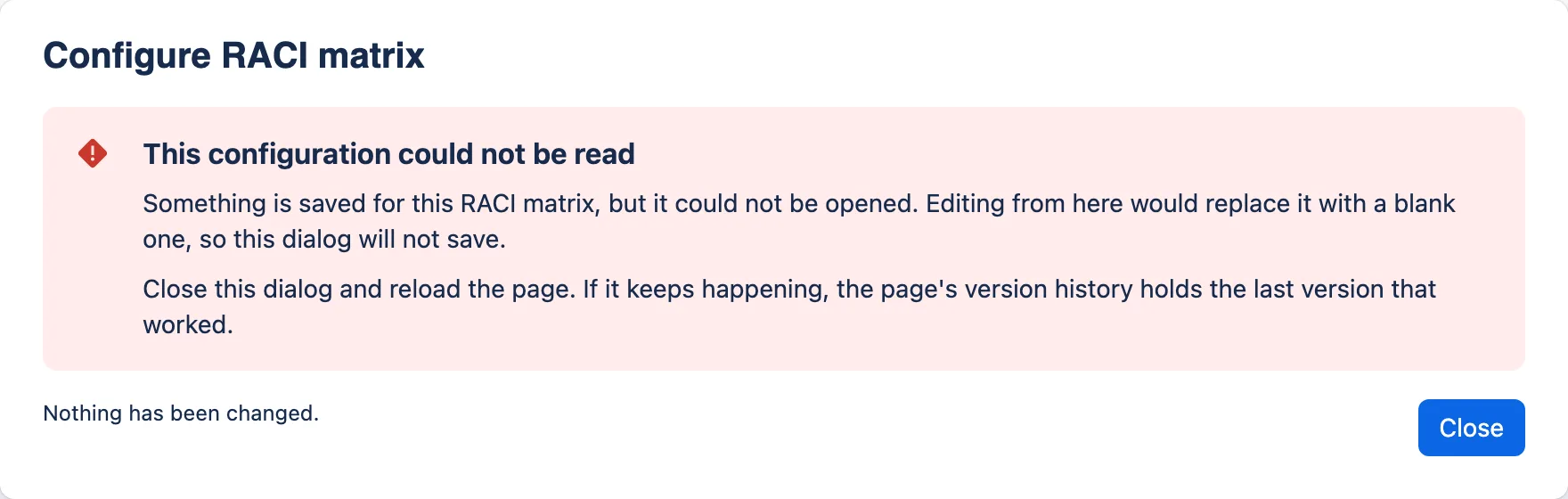
What it means. Something is stored for this macro, but it could not be opened: either the stored text is not valid JSON, or Confluence would not hand the configuration over.
Why it refuses to save. A blank form with a live Save button over configuration that is still stored would let the author overwrite it without knowing. So the dialog offers Close and nothing else, and says “Nothing has been changed.”
What to do:
- Close the dialog, reload the page, and open the dialog again. If Confluence failed to hand the configuration over, this usually clears it.
- If the message comes back, open the page’s version history, find the most recent version in which the macro rendered its content, and restore it. This restores the whole page, so re-apply anything else that changed since.
- The app writes valid JSON on every save, so the likely cause is something else editing the page’s stored content, such as a hand edit of the page source or a bulk-editing or migration tool. If nothing like that has happened and the message recurs, escalate with the page URL (Support).
“Saved by a newer version of this app”
A yellow message above the tabs of a configuration dialog. The macro was last saved by a newer version of ServiceAccord than the one installed here — most often a page copied from a site that has a later version, or a rollback after an update.
The dialog works normally and Save still saves, but it writes the macro back in this version’s form: anything the newer version stored that this one does not know about is lost. If that matters, close the dialog without saving and edit the macro on a site running the newer version, or wait for this site to update. The published page is unaffected either way.
An export says “has not been configured”, but the page renders
The export prints “This RACI matrix has not been configured.”, “This service review record has not been configured.” or “These service level targets have not been configured.” If the page shows the empty state as well, see the first runbook entry instead.
If the page renders properly, this is a known risk area. Atlassian’s documentation does not settle where a macro’s configuration sits in the data passed to an export function, and it has been reported to differ between PDF and Word. The export function checks four likely locations. If none holds anything, it writes the sentence and logs the names of the top-level keys it did receive (the vendor’s decision log). The manual checks, which settle this on a real site, are not yet run.
- Note the page URL, the date and time of the export with your time zone, PDF or Word, and which macros were affected.
- Escalate with those details (Support). The vendor looks for the log line beginning “Export payload carried no macro configuration at any known path”, in the developer console, which shows production logs only for sites that have granted log access.
- If you have switched off log access, or the vendor cannot see your site’s logs, download the app’s logs from Atlassian Administration and send them. For production this may be the main route. You do not need to send page content: the log line records key names only.
An export is incomplete or fails on a page with many macros
Atlassian warns that many macro instances on one page can trigger rate limiting during export. That would not produce the “has not been configured” sentence, which the app writes only when it finds no configuration, but it could produce a failed export or a missing macro. Try exporting a copy of the page with fewer macros. If that works, report the page’s macro count with the details above.
Export differences that are expected
Readers sometimes report these as faults. They are how the export currently behaves:
| Macro | On the page | In the export |
|---|---|---|
| RACI Matrix | Coloured letter badges, the subtitle, a bold “Legend” label and a warning line when there are warnings | The same letters (R/A, and — in an empty cell) as plain text. Role names that cannot fit the page whole become initials, with a Roles key above the table. The subtitle, the “Legend” label and the warning line are not exported |
| Service Review Record | Heading is the service name. Improvement actions come before Risks and issues. Small section headings, including “Legend” above the RAG legend sentence when that is shown. A warning line at the foot if the record has warnings | Heading is “Service review — {service name}”. Risks and issues come before Improvement actions. The same section headings, except “Legend”. No RAG legend sentence, no warning line, and no “N actions are overdue.” line |
| Service Level Targets | Compact view hides owner, review date, measurement period and notes. A warning line at the foot if the targets have warnings | Compact view is ignored. Everything filled in is exported. No warning line |
| All | Dates and overdue marks follow the reader’s own locale and local date | Dates and “(overdue)” are worked out by the export function on Atlassian’s servers, so they use the server’s default locale and clock (probably UTC) and may differ from what the reader saw |
The reader guide covers these from the reader’s side. Two readers in different time zones can also see different overdue marks on the same page around midnight; each reader’s own date decides. That is intended.
A macro is missing from the macro browser
- Search, do not browse. Type
/and search for part of the name, such as “RACI”. A development or staging installation carries a suffix in its title. - Is the app installed on this site, in the right environment? Check your app management. The
vendor can run
forge install listto see where it is installed. - Was it uninstalled or disabled in your app management?
- Is the author a guest? See Task 5.
- Is the page in the legacy editor? Forge macros need the current editor.
A macro shows Confluence’s placeholder instead of rendering
The app is not available on this site: it has been uninstalled, or the macro came from an installation (or environment) that is no longer there. The data is still in the page, and reinstalling the app should bring it back.
Save fails, or the dialog does not close
A failed save keeps the author’s changes and shows an error beside the Save button (wording in the quick reference). Ask the author to check their connection and try again.
After a successful save, Confluence is expected to close the dialog. During a save, Save shows a spinner and Cancel is disabled. If the dialog stays open with Save spinning, Save will not come back on its own; this platform behaviour is not yet tested on a live site (the save-and-close row, 4.35). Ask the author to note what they changed, reload, check whether the change was kept, and report it.
Limitations worth knowing
- Not for guests or anonymous viewers, as the manifest stands (Task 5).
- Macro text is expected not to appear in Confluence search (Search indexing; not yet checked on a live site).
- No cross-page reporting and no import. Each macro stands alone, and a RACI cannot be pasted in from a spreadsheet.
- Editing needs a desktop-sized screen, and PDF export uses the Word renderer (Task 3).
- Accessibility limits from UI Kit (Task 8).
- Not yet proven on a live site. The app has been deployed to the vendor’s development environment, but the test-plan rows that need a real site (export, page history, lifecycle, restrictions, themes, mobile, eligibility) are still recorded as not run (the vendor’s internal test plan).
Quick reference
Facts for your security review
The Evidence column cites the vendor’s private repository. The last column says where you can see
the same fact without it. “Vendor output” means the forge version details and forge eligibility
output in question 5.
| Question | Answer | Evidence (vendor repository) | You can see it in |
|---|---|---|---|
| Vendor and price | ITSM Ltd. Free | the security page | Marketplace listing, once published |
| Hosting | Entirely on Atlassian’s Forge platform. No vendor servers | manifest.yml |
Vendor output (remotes) |
| OAuth scopes requested | None. permissions: scopes: [] |
manifest.yml, test/no-egress.test.ts |
Install consent screen; vendor output |
| Calls to Confluence or Jira APIs | None | test/no-egress.test.ts |
Follows from no scopes |
| External egress, remotes, external permissions | None | manifest.yml, test/no-egress.test.ts |
Vendor output |
| Runtime code | Three direct dependencies (react, @forge/react, @forge/bridge) and their bundled transitive dependencies, all running inside Atlassian’s runtime with no egress permission |
package.json, package-lock.json |
Vendor (question 7) |
| Web triggers, scheduled jobs, event triggers | None | manifest.yml, test/no-egress.test.ts |
Vendor output (modules) |
| App-owned storage (Forge KVS or other) | None | package.json, test/no-egress.test.ts |
— |
| Where macro data is stored | In the macro’s configuration parameter data, inside the Confluence page |
src/shared/config.ts, the vendor’s decision log |
— |
| Where macro data is processed | The browser for viewing and editing. Forge compute for export (when), which Atlassian aims but does not guarantee to run in your site’s location | src/adf-export.ts; Atlassian’s Forge data residency page |
Atlassian’s documentation |
| Function runs per ordinary page view | Zero (predicted from the design, not yet measured) | the vendor’s decision log, the vendor’s internal test plan | Vendor’s developer console |
| Analytics or telemetry | None in the source | the security page | Vendor output (analytics) |
| Logging | Error messages only. Export functions log payload key names, or a parse failure whose message can quote a short excerpt of a damaged document. Front-end logs and log export are vendor settings the source cannot show | src/adf-export.ts, src/shared/config.ts |
Vendor, in writing (question 3) |
| Customer log control | Logs access for the app in Atlassian Administration. Logs stop appearing in the developer console; effect on log export unconfirmed | Atlassian’s Access app logs page | Your Connected apps entry |
| Personal data | Only what authors type into macro fields | Task 2 | — |
| Search indexing of macro text | Not enabled (not yet checked on a live site) | manifest.yml (no indexing declared) |
A test search on your site |
| Access control | Confluence page and space permissions. No app-specific permission | Task 5 | — |
| Guests and anonymous users | Not enabled | manifest.yml (no unlicensedAccess) |
A test page on your site |
| Data after uninstall | App retains nothing. Macro data stays in pages | the security page | — |
| Runs on Atlassian | Designed to qualify. Storage criterion unconfirmed. Not yet checked with forge eligibility |
the security page, the vendor’s internal test plan | Vendor output; badge once listed |
| Change control | Minor versions apply without consent. Scope and egress changes need your approval, and remote changes do in most cases | This guide’s Security incidents and change control; Atlassian’s App versions page | Your app management (upgrade requests) |
| Penetration test, CAIQ Lite, certifications | None | the privacy and security answers | — |
| Privacy policy, security policy, DPA | Not yet published | vendor, in writing | — |
| Vendor GDPR and CCPA role | Not yet decided | vendor, in writing | — |
| Accessibility conformance report | None yet. Audit procedure written, not run | the accessibility run-book | — |
Messages you may be asked about
| Message | Where | What it means | What to do |
|---|---|---|---|
| RACI Matrix / “Edit this macro to add the roles and activities you want to map.” | Page | The matrix has no named role, or no named activity | Configure it. See the empty-state checks |
| Service Review Record / “Edit this macro to record the service, review period and outcomes.” | Page | Not configured by that macro’s rule | As above |
| Service Level Targets / “Edit this macro to record the service, its agreement type and its targets.” | Page | Not configured by that macro’s rule | As above |
| “1 assignment warning — edit this macro to review it.” / “{N} assignment warnings — edit this macro to review them.” | Foot of a RACI matrix on a page | Advice about the matrix, such as an activity with no accountable role. Not an error | Pass to the page’s author |
| “1 record warning — edit this macro to review it.” / “{N} record warnings — edit this macro to review them.” | Foot of a Service Review Record on a page | Advice about the record, such as a Red KPI with no comment or an overdue action. Not an error | Pass to the page’s author |
| “1 warning — edit this macro to review it.” / “{N} warnings — edit this macro to review them.” | Foot of a Service Level Targets macro on a page | Advice about the targets, such as a priority used twice. Not an error | Pass to the page’s author |
| “{N} things worth checking” | Top of a configuration dialog | Advisory warnings. Never blocks saving | None needed |
| “This configuration could not be read” | Configuration dialog | Something is stored and cannot be opened. The dialog will not save | Runbook |
| “The matrix could not be saved” / “Check your connection and try again. Your changes are still here.” | RACI dialog footer | Save failed. Changes are kept in the dialog | Retry. Escalate if it persists |
| “Could not save” / “This configuration could not be saved. Your changes are still here — please try again.” | Service Review dialog footer | Save failed. Changes are kept | As above |
| “Could not save” / “Sorry, this could not be saved. Please try again.” | Service Level Targets dialog footer | Save failed | As above |
| “This RACI matrix has not been configured.” (and the two equivalents) | PDF or Word export | No configuration was found for the export | Runbook |
Limits
Fixed in the app; an admin cannot change them. Fields stop accepting text at their limit. Nothing is required, and every dialog saves an unfinished record. For the rest of the documentation, see the guides index and the vendor’s decision log.
| Macro | Rows | Text |
|---|---|---|
| RACI Matrix | Up to 15 roles and 60 activities | Title 120 characters, role 60, activity 160, note 240 |
| Service Review Record | Up to 40 KPIs and 40 actions | Short fields 120, long fields 2000, table cells 240 |
| Service Level Targets | Up to 12 targets | Short fields 120, notes 2000, target cells 120 |
Support
The published support address is on the pricing page. No response time is promised, and none is invented. Until a support and security contact is published, the interim route for faults and security concerns alike is the person at ITSM Ltd who gave you the installation link. Keep the details each runbook entry asks for (page URL, date and time with time zone, export type, macros affected) so they can be passed on. Once the Marketplace listing is live, it will carry the vendor’s support details.