
From an empty page to a record you can put in front of a customer.
The same seven steps for all three macros. None of them involves leaving Confluence, and none of them costs a Forge function invocation until somebody exports the page.
- Author Anyone who can edit the page
- Configuration dialog Runs in the browser
- Macro configuration One JSON document, saved with the page
- Rendered macro Zero Forge function invocations
- PDF or Word export One function call, only when exporting
No outbound request of any kind leaves this boundary.
-
Insert the macro
From the Confluence macro browser, on any page you can edit. There is no separate app permission and no setup step: if you can edit the page, you can add the macro. Before it is configured it renders as a quiet panel with its name and a hint — the normal first state, not an error.

The empty state is deliberately calm. This is the normal first state of every macro, not an error. Describe this screenshot
A plain grey box with the bold title “RACI Matrix” and the line “Edit this macro to add the roles and activities you want to map.” -
Configure it in a full-screen dialog
The configuration surface opens as a full-viewport dialog with tabs, and a footer that counts what you have used: “5 of 15 roles · 12 of 60 activities”. Beside the count, always: “Nothing here is required. You can save an unfinished matrix and come back to it.” — or record, or agreement, in the other two. An empty RACI matrix can start from any of 34 practice templates instead of a blank grid.
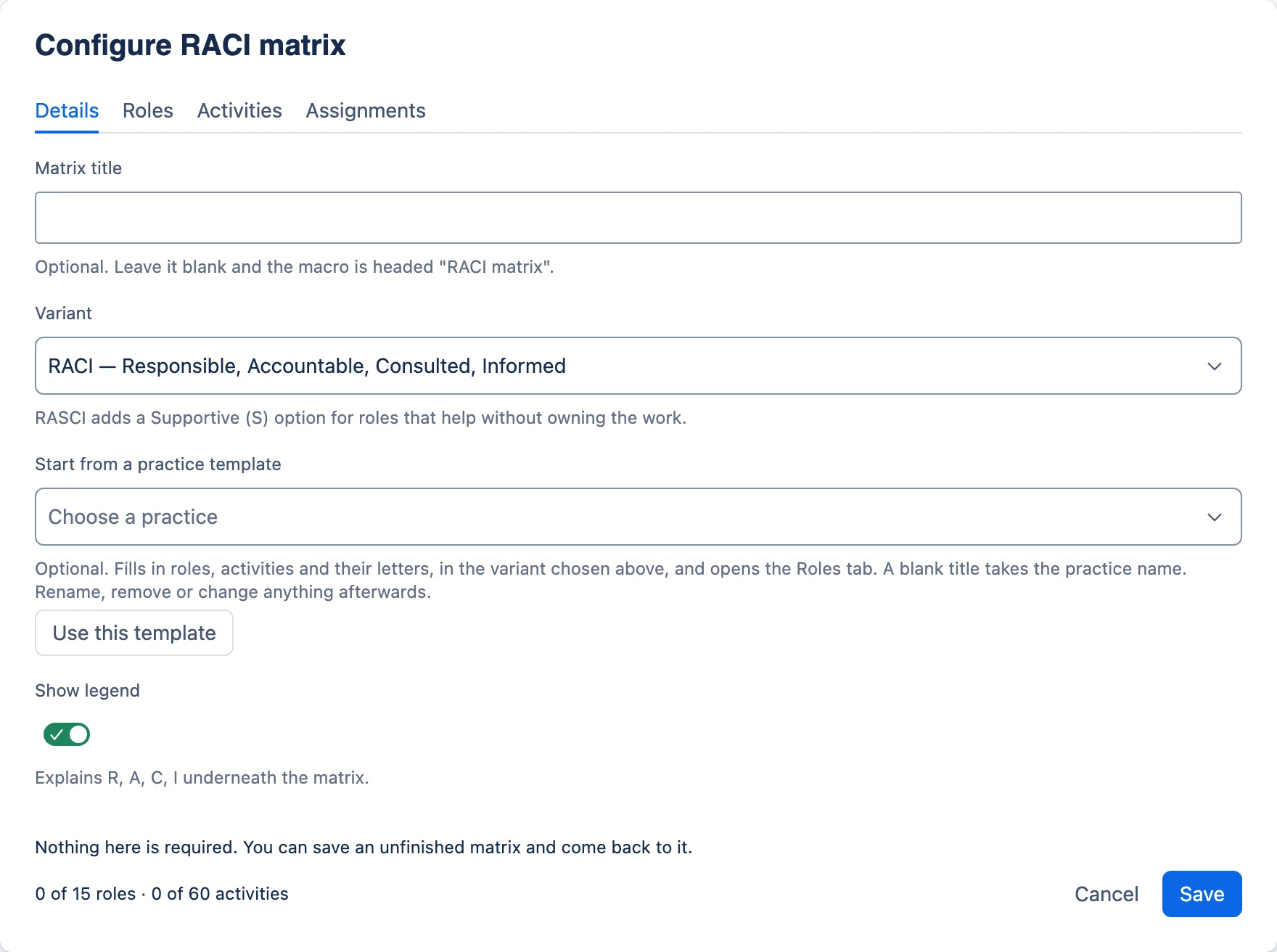
The configuration dialog opens on Details, with a live count in the footer. Start blank, or from a practice template. Nothing on any tab is required. Describe this screenshot
The Configure RACI matrix dialog, freshly opened. Four tabs — Details, Roles, Activities, Assignments — with Details selected. The Matrix title field is empty, Variant is set to RACI, and below it “Start from a practice template” shows an empty “Choose a practice” picker with a Use this template button. Show legend is switched on, and the footer reads “0 of 15 roles · 0 of 60 activities” beside Cancel and Save. -
Fill in as much as you have
A workshop rarely produces a finished matrix, and a review is often typed while it is happening. Both are normal. Every field is optional, the dialog saves half-finished work, and the record renders on the page with whatever is in it.
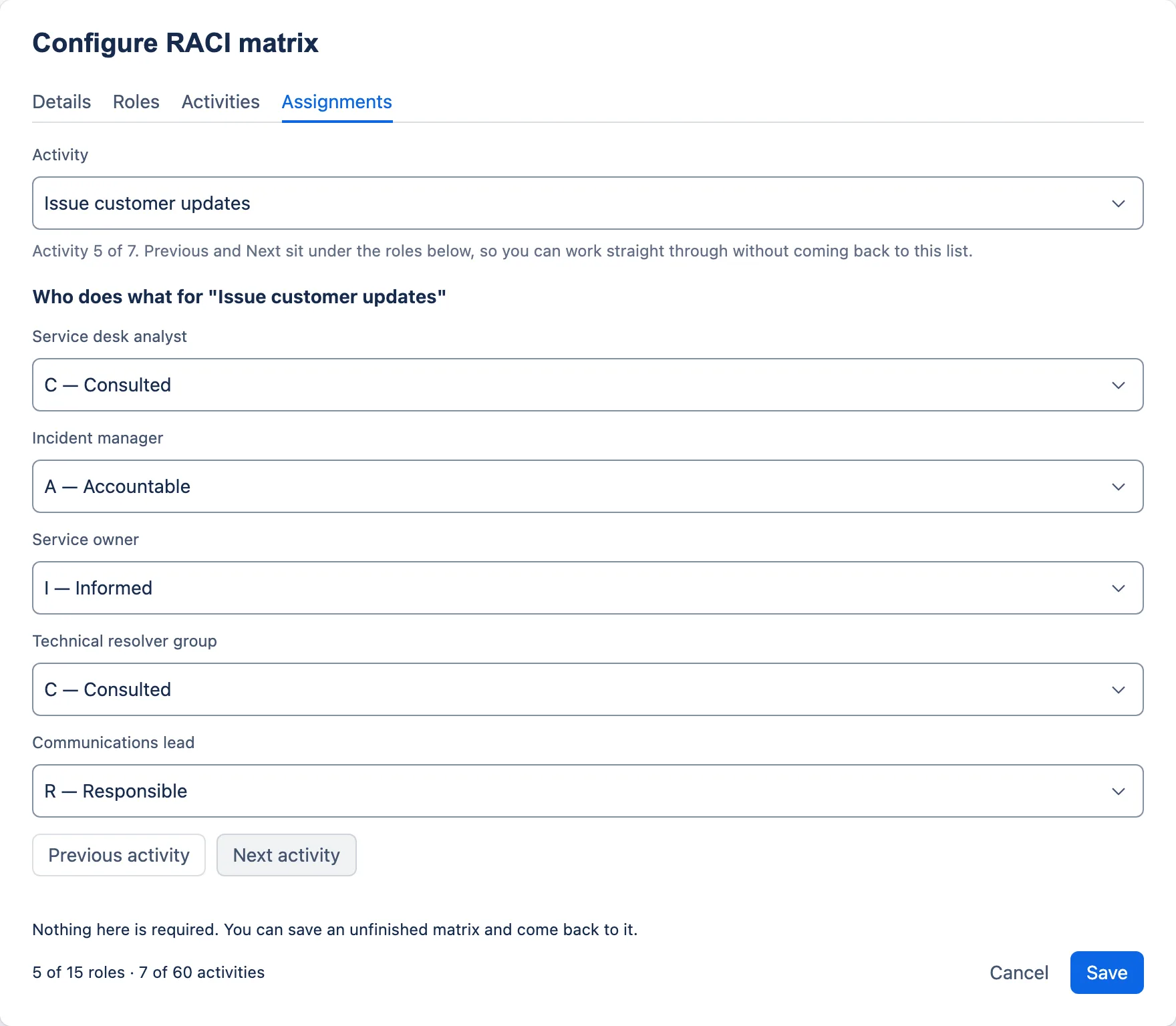
Assignments are made one activity at a time, so a workshop can work down the list rather than across a grid. Describe this screenshot
The Assignments tab on activity 5, “Issue customer updates”. The Activity list at the top shows the activity, with the helper “Activity 5 of 7”. Below the heading Who does what for “Issue customer updates” are five role choices: Service desk analyst C — Consulted, Incident manager A — Accountable, Service owner I — Informed, Technical resolver group C — Consulted, Communications lead R — Responsible. Previous activity and Next activity buttons sit underneath. -
Read the advice, then ignore it if you want to
A banner above the tabs lists what looks unfinished — an activity nobody is accountable for, a KPI with a target but no actual, a priority with no time against it. In the RACI matrix the first warning about each activity or role carries a button that switches tab and selects the exact row it is about; in the other two the message names the row. Nothing here blocks the save.
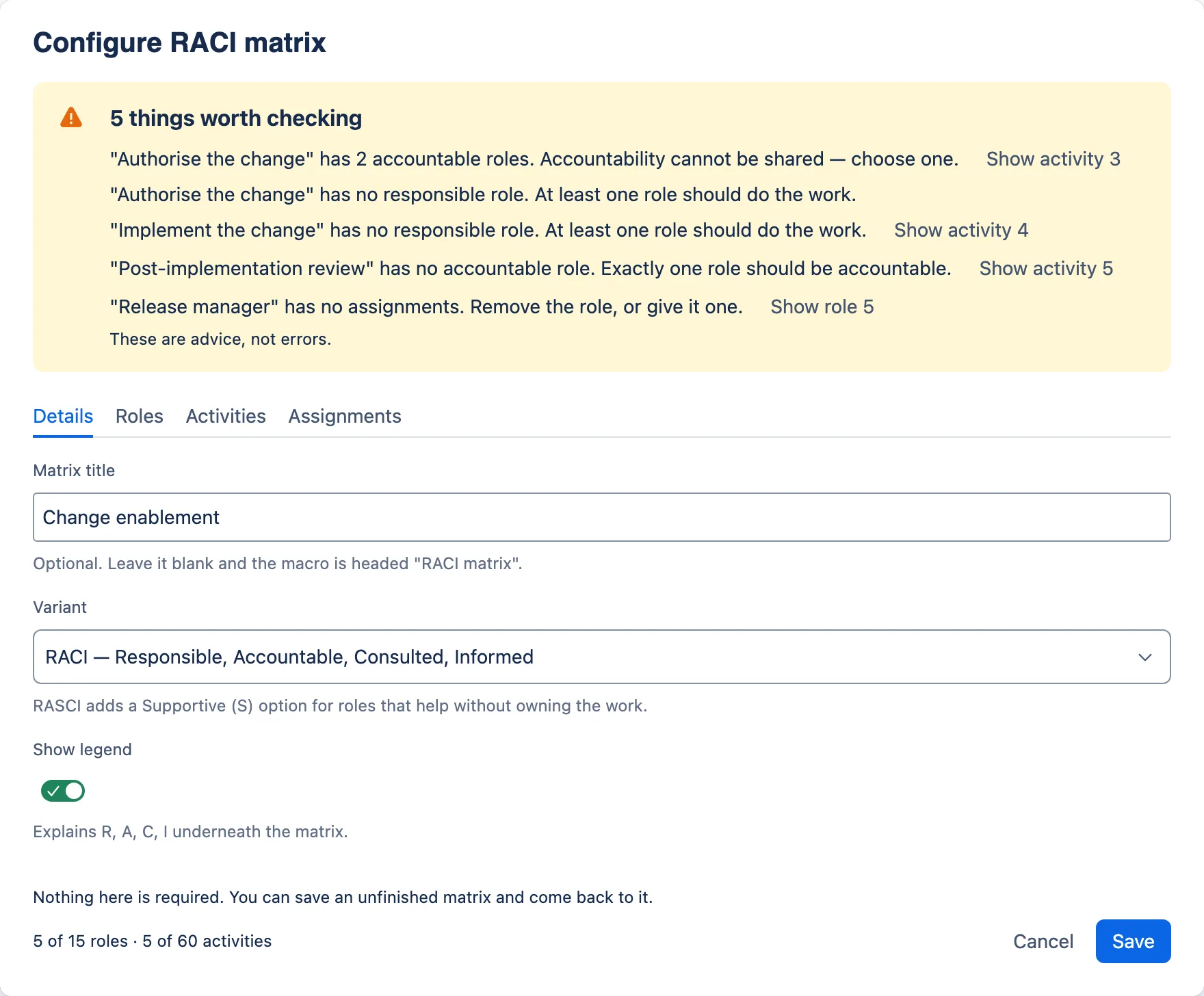
Advisory validation. The first warning about each row carries a button that takes you to it — and none of them stops you saving. Describe this screenshot
The Change enablement matrix open in the dialog, with a yellow banner titled “5 things worth checking”. It lists: “Authorise the change” has 2 accountable roles, with a Show activity 3 button; “Authorise the change” has no responsible role, with no button of its own, since the one before already goes there; “Implement the change” has no responsible role, Show activity 4; “Post-implementation review” has no accountable role, Show activity 5; “Release manager” has no assignments, Show role 5. The banner closes with “These are advice, not errors.” -
Save — or change your mind safely
Save normalises the record on the way out, so what is stored is always valid. Cancelling with unsaved changes asks first, and while it asks the rest of the footer stands down so there is one decision to make rather than four buttons competing for it. Closing the dialog with Esc or its × keeps your work: Confluence closes it without asking the app, so the app saves what you typed. Only Cancel, then Discard changes, throws work away — and a configuration that could not be read is never saved over.
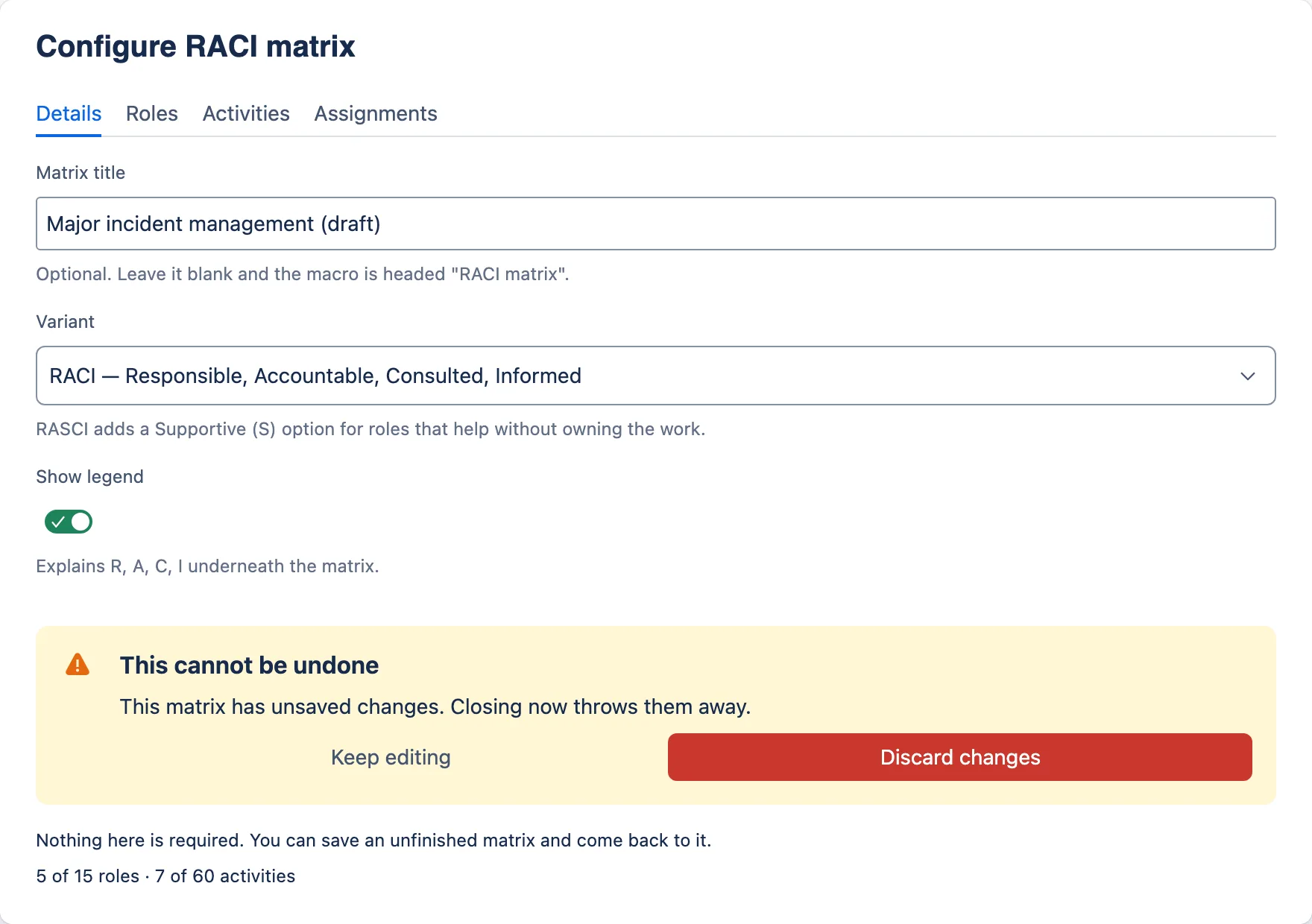
Cancelling with unsaved work asks first, and while it asks the rest of the footer stands down. Closing with Esc or the dialog’s × saves instead: only Discard changes throws work away. Describe this screenshot
The Details tab with a yellow prompt titled “This cannot be undone” reading “This matrix has unsaved changes. Closing now throws them away.” with a Keep editing button and a red Discard changes button. The matrix title reads “Major incident management (draft)”. -
The page renders — at zero cost
Viewing a page costs nothing. The macro reads what is stored in the page and draws it — there is no code running behind it to call — so a page view runs no Forge function at all, however many macros are on it. That follows from the app declaring no resolver rather than from a measurement on a live site. The only three functions in the app are the export handlers, and they run when somebody exports.
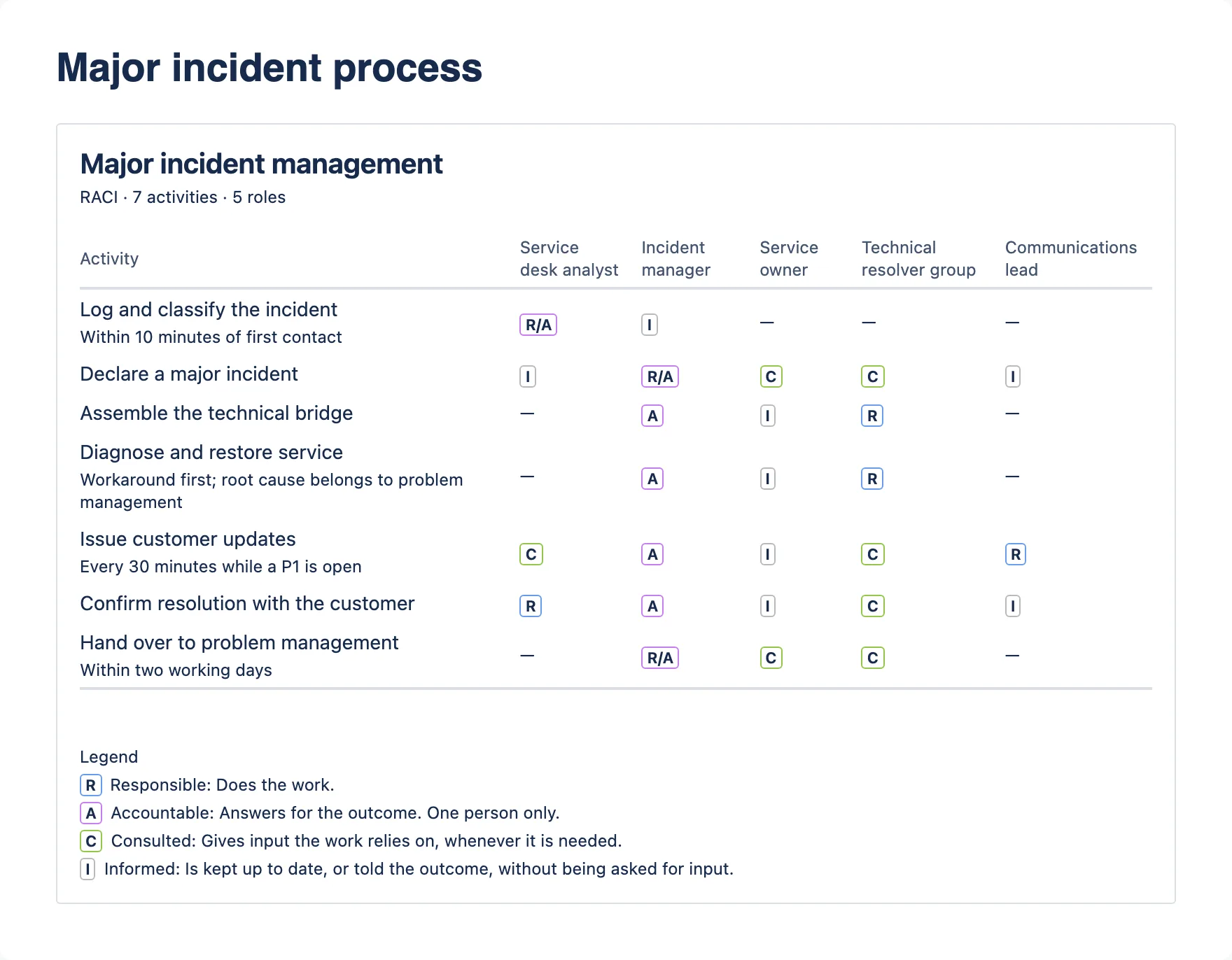
A published RACI matrix. Every cell carries its letter as text, so the colour is never the only thing saying what it means. Describe this screenshot
A RACI matrix titled “Major incident management”, subtitle “RACI · 7 activities · 5 roles”. Activities run down the left, some with a short note in smaller text; five role columns run across. Cells hold coloured letter labels such as R/A, A, R, C and I, or a dash. A legend underneath explains R, A, C and I. -
Export it for the audit pack
Exporting the page to PDF or Word runs the macro’s export handler once per instance. It emits real headings and real tables with real header cells, generated from the same model the page renders from — so an exported record cannot drift from the one on the page. Dates are written day-first (“27 Sept 2026”). A RACI matrix whose role names cannot fit a portrait page whole is exported with the roles’ initials as column headings and a Roles key above the table; the page itself keeps the full names.
What that looks like for each macro.
Running a RACI workshop
- Name the matrix, and choose RACI or RASCI — then start from one of 34 practice templates, or from a blank grid.
- Add the roles as columns — the role, not the person.
- Add the activities as rows, with a note where one line is not enough.
- Work down the activities one at a time, setting each role’s letter.
- Read the banner. Walk to each gap. Fix what the room can agree.
- Save, publish, and come back after the second session.
Chairing a service review
- Fill in the service, the period, the date and who is in the room.
- Set the overall status — or leave it at Not set until the room decides.
- Add the KPIs: metric, target, actual, status, comment.
- Add improvement actions with an owner and a due date each.
- Record risks and issues, one per line.
- Save. Next quarter, copy the page and update it.
Publishing service levels
- Name the service, and say which kind of agreement this is.
- State service hours and support hours separately.
- Fill the P1–P4 ladder with one button, then edit every cell that is wrong.
- Add the availability target and the measurement period.
- Put the exclusions in notes, where there is room for the clause.
- Turn on compact view if the page only needs the headline numbers.
Four things a practitioner asks in the first ten minutes.
One macro per agreement, for one service
Do not put two services’ targets in one table, and do not mix an SLA with the OLA that supports it. Give each its own page or its own macro, and link the customer-facing SLA to the operational agreements and supplier contracts underneath it. That structure is what makes the set navigable a year later.
One page per review, copied forward
Copy last quarter’s page, update it, publish. Each review then has its own page history, its own export and its own permissions, and the series reads in order. A single page edited in place gives you one artefact and no trail.
Export on the day you issue the report
Page history is a record of edits, not a fixed record: restore a version and the page changes. For ITIL 4 continual improvement or ISO/IEC 20000 service reporting, export the PDF on the day the review is issued and keep it with the service records. Only the issued PDF is fixed.
Say when the clock starts
“Four business hours to respond” is only half an agreement. From logging, or from assignment to the resolver group? Does time awaiting the customer count? A target cell holds 120 characters, which is room for the target and not for the clause — put the clause in Notes and exclusions, where there is room for it.
Everything Confluence already does, it keeps doing.
Each macro stores one JSON document in its own configuration parameter. That is part of the page, like any other macro parameter — which means all of this works with no code on the app’s side.
- Page history — a change to a macro is a change to the page, and it is in the history like any other
- Copy and move — the record goes with the page, across spaces
- Templates — a page template can carry a pre-filled record
- Restrictions — page restrictions apply; there is no second permission model
- Space export and trash restore — the record is in the export, and comes back with the page
- Uninstall — nothing to delete, because nothing was held outside your pages
Describe this screenshot
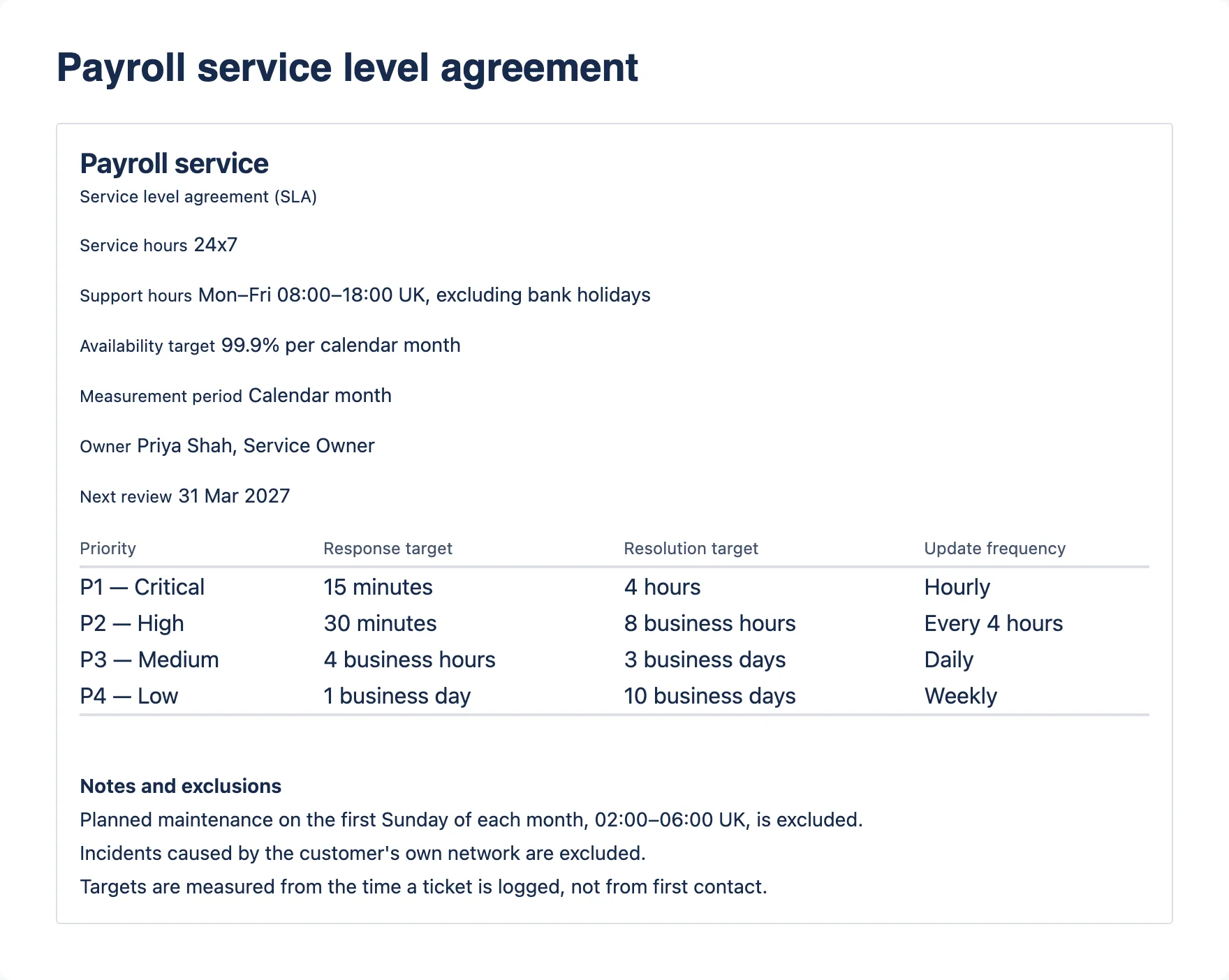
A service level targets macro headed “Payroll service”, subtitle “Service level agreement (SLA)”. Detail lines show Service hours 24x7, Support hours Mon–Fri 08:00–18:00 UK excluding bank holidays, Availability target 99.9% per calendar month, Measurement period, Owner and Next review 31 Mar 2027. A targets table lists P1 — Critical to P4 — Low with response, resolution and update frequency. Three notes and exclusions follow, including planned maintenance and when targets are measured from.Three records, on the page the service already lives on.
One install by a site administrator, then nothing: no app permission to manage, no accounts to create, no licence to renew, and no change in cost at any number of users.
Not listed yet: it goes to the Atlassian Marketplace as a free app once it has passed review. The button opens your own mail client. You hear once, on the day it lists, and never again. What is in 2.7.0
Need this shaped to your organisation — the practices, the roles, the reporting line? That is what ITSM Ltd does for a living.