
Three macros, in full.
Every field an author can type, every limit, and the exact wording of every advisory check. If something is missing from this page it is missing from the app.
RACI MatrixSays who is accountable, and when nobody is
A RACI (or RASCI) matrix that can start from any of 34 practice templates, with advisory validation: it warns when accountability is missing or shared, but never blocks you from saving a matrix mid-workshop.
Start from a practice, not a blank grid. An empty matrix can be filled from a template for any of the 34 ITIL® 4 practices — 14 general, 17 service and 3 technical management — in RACI or RASCI. Each one fills in the roles, the activities and their letters, written for this app. Every template is tested to raise no warning, keeps separate duties separate, and gives every accountable letter to a single named role, never a team or a board.
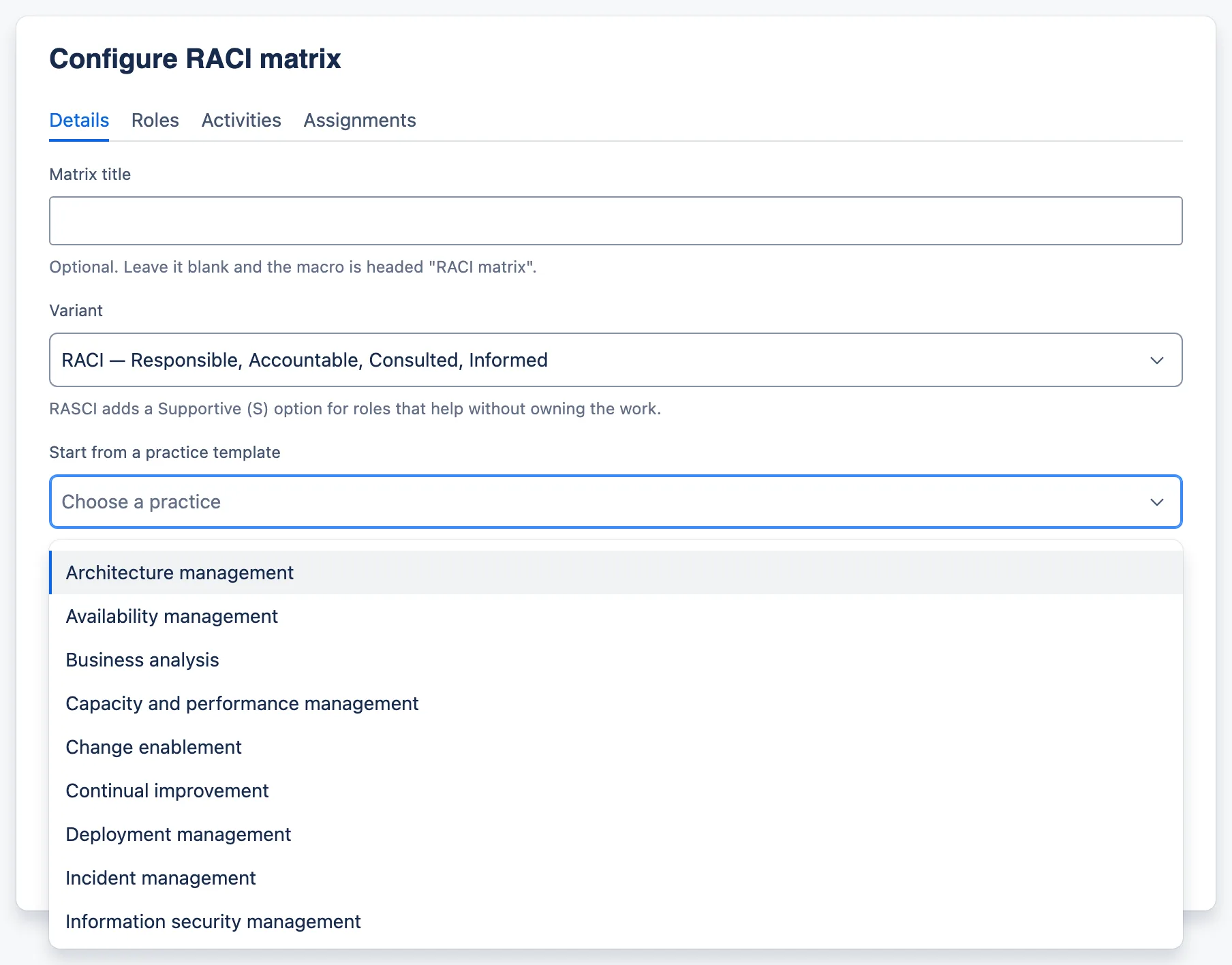
The picker lists the practices alphabetically and finds one as you type. The template itself is never stored: what you save is an ordinary matrix, fully editable, with nothing linking it back to the template.
Describe this screenshot
The Details tab of a new RACI matrix with the “Start from a practice template” picker open. Its alphabetical list begins Architecture management, Availability management, Business analysis, Capacity and performance management, Change enablement, Continual improvement, Deployment management, Incident management, Information security management, and scrolls for the rest.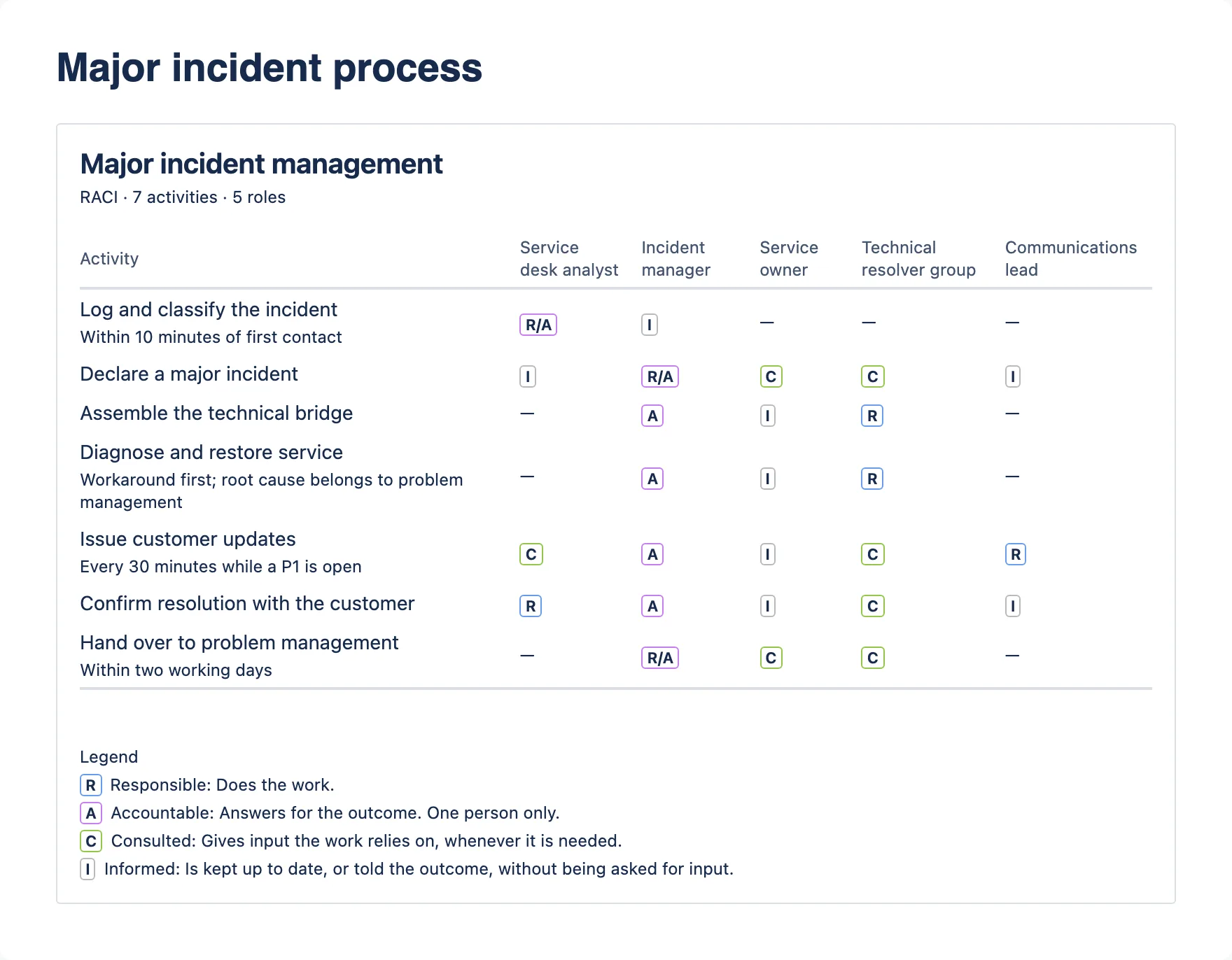
Describe this screenshot
A RACI matrix titled “Major incident management”, subtitle “RACI · 7 activities · 5 roles”. Activities run down the left, some with a short note in smaller text; five role columns run across. Cells hold coloured letter labels such as R/A, A, R, C and I, or a dash. A legend underneath explains R, A, C and I.What the author fills in
Details tab
- Matrix title — optional. Leave it blank and the macro is headed “RACI matrix”.
- Variant — RACI or RASCI. Switching back to RACI clears any Supportive assignments. The field warns you beforehand, but unlike removing a row this one is not confirmed — the S cells go immediately.
- Start from a practice template — shown while the matrix has no roles and no activities. Choose one of the 34 practices, alphabetical and searchable, and Use this template fills in the roles, activities and letters in the variant chosen above. The template is never stored; what you save is an ordinary matrix.
- Show legend — on by default.
Roles tab
- Role name, one per column. Name the role, not the person.
Activities tab
- Activity name, one per row. One line each — the detail belongs in the note.
- Note — a short qualifier shown in smaller text under the activity name.
Assignments tab
- One activity at a time, with a choice per role: not involved, R, A, R/A, C, I — and S in RASCI.
- Previous and Next activity buttons, so a workshop can work down the list.
What a reader sees
- A title, and a subtitle counting what is in it — “RACI · 7 activities · 5 roles”.
- One column per role, one row per activity, and the letter inside each coloured label as text. On a narrow screen the Activity column keeps whole words and the role columns scroll sideways.
- An em dash where a role is not involved, so a reader can tell “no involvement” from “nobody filled this in”.
- An optional legend, written for this app and not quoted from any publication.
- One quiet line under the legend if the matrix has gaps — “5 assignment warnings — edit this macro to review them.” Never a banner: a published page should not shout at its readers. Worth knowing before you put a half-finished matrix in front of a customer.
Limits
| Roles | up to 15 |
|---|---|
| Activities | up to 60 |
| Variants | RACI and RASCI |
| Practice templates | 34 |
| Matrix title | 120 characters |
| Role name | 60 characters |
| Activity name | 160 characters |
| Activity note | 240 characters |
Character caps count user-perceived characters rather than code units, so a cap cannot cut an emoji in half or drop a combining mark. The field stops the typing at the limit rather than discarding the overflow when you save.
What it tells you, and never blocks you on
The exact wording, from the app’s own source. Every one of these saves anyway.
- “Log the incident” has no accountable role. Exactly one role should be accountable.
- “Authorise the change” has 2 accountable roles. Accountability cannot be shared — choose one.
- “Implement the change” has no responsible role. At least one role should do the work.
- “Release manager” has no assignments. Remove the role, or give it one.
- “Service owner” is accountable for every activity. Check that accountability genuinely sits with one role throughout, rather than defaulting to it.
- Role 2 has no name. A role without a name is not saved, and its assignments go with it.
- Activity 8 has no name. An activity without a name is not saved.
R/A is the one permitted combination. In a small team the same role routinely both does the work and answers for it. Every other combination is rejected — a matrix where three roles share accountability is not a RACI, it is a wish.
The legend
Written for this app. Not reproduced from any ITIL publication or glossary.
| Letter | Term | Meaning |
|---|---|---|
| R | Responsible | Does the work. |
| A | Accountable | Answers for the outcome. One person only. |
| S | Supportive (RASCI only) | Helps the responsible role complete the work. |
| C | Consulted | Gives input the work relies on, whenever it is needed. |
| I | Informed | Is kept up to date, or told the outcome, without being asked for input. |
Describe this screenshot
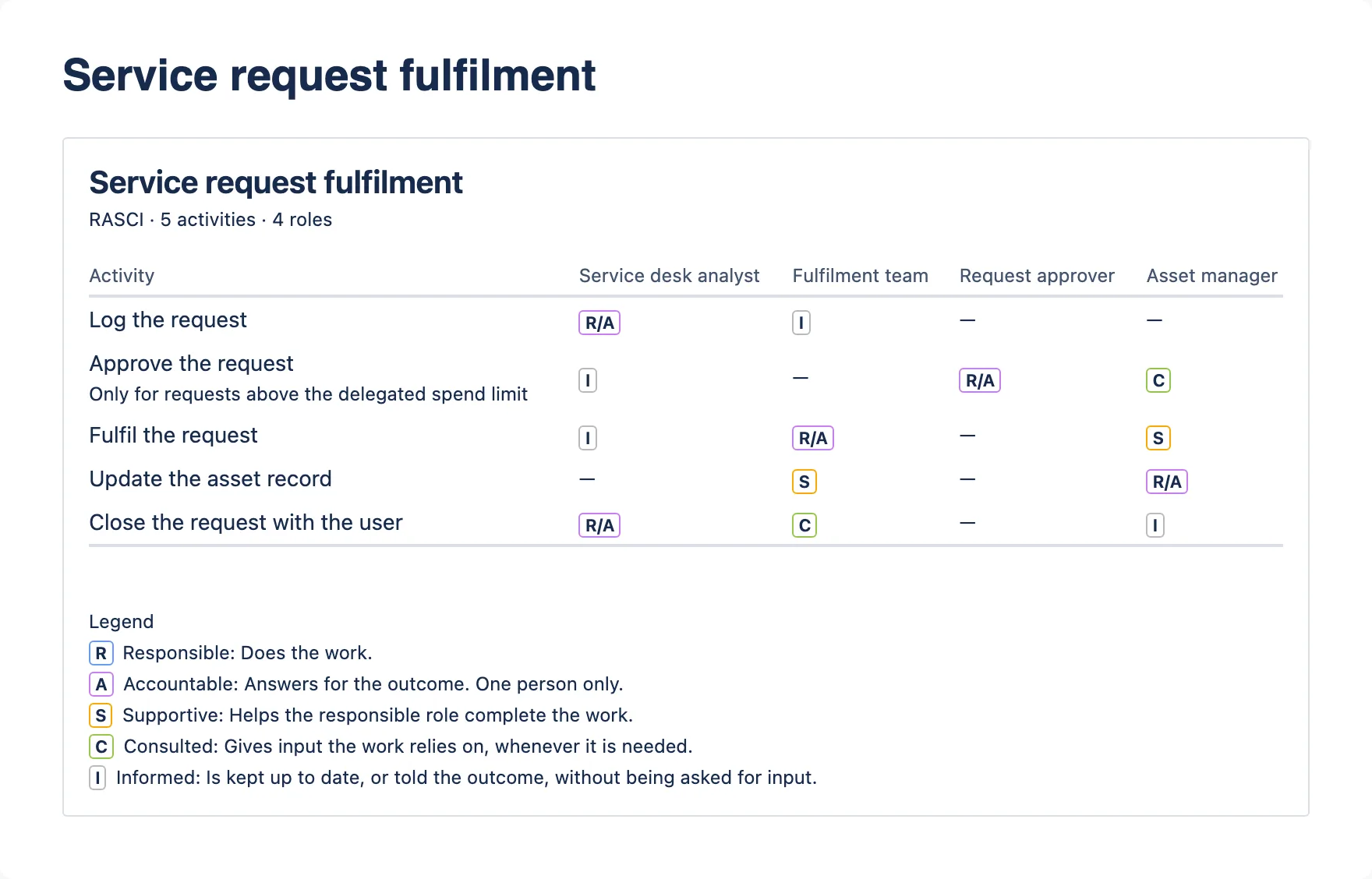
A RASCI matrix titled “Service request fulfilment”, subtitle “RASCI · 5 activities · 4 roles”. Two cells show a yellow S label, under the Asset manager and Fulfilment team columns. The legend includes the line “S — Supportive: Helps the responsible role complete the work.”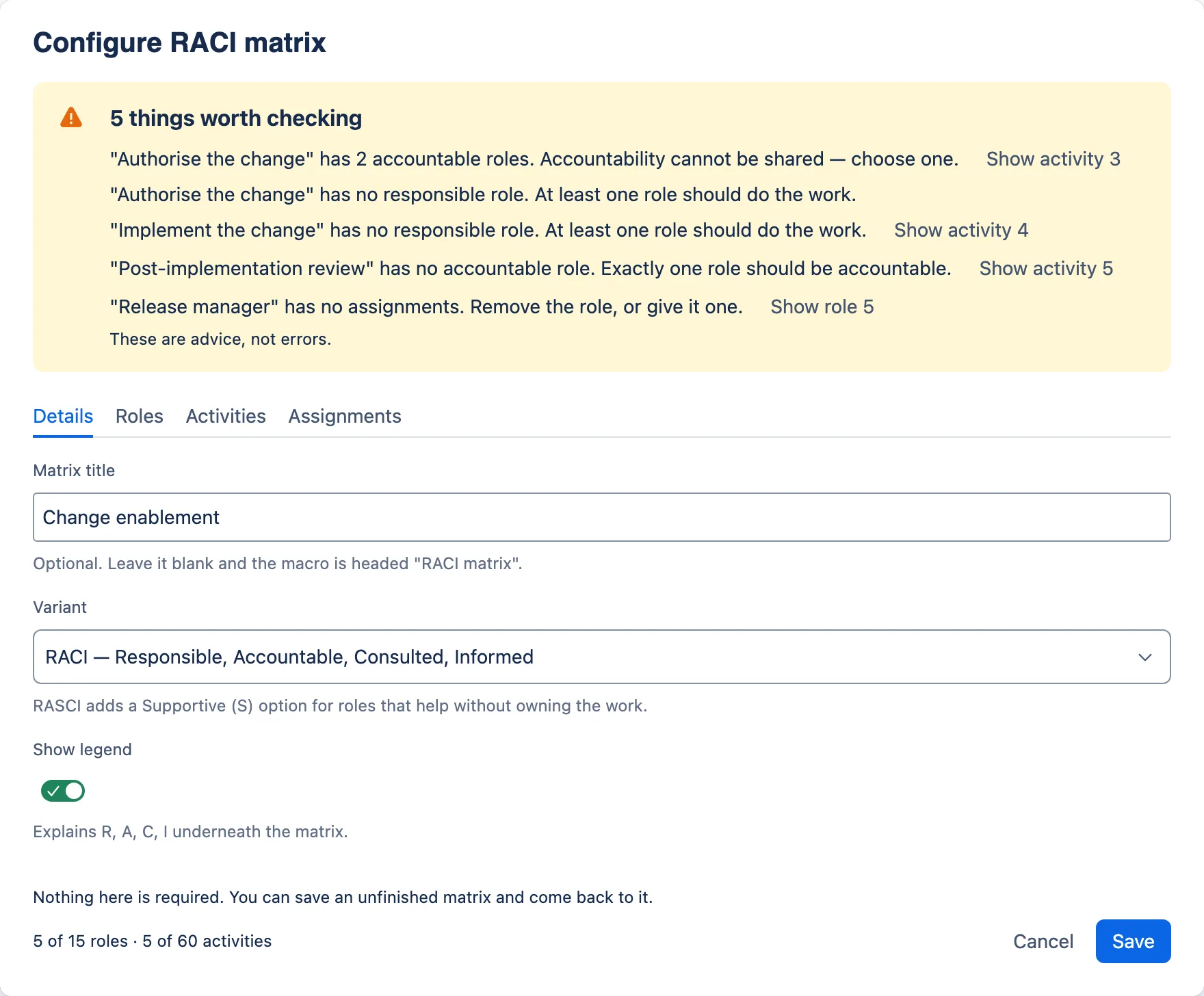
Describe this screenshot
The Change enablement matrix open in the dialog, with a yellow banner titled “5 things worth checking”. It lists: “Authorise the change” has 2 accountable roles, with a Show activity 3 button; “Authorise the change” has no responsible role, with no button of its own, since the one before already goes there; “Implement the change” has no responsible role, Show activity 4; “Post-implementation review” has no accountable role, Show activity 5; “Release manager” has no assignments, Show role 5. The banner closes with “These are advice, not errors.”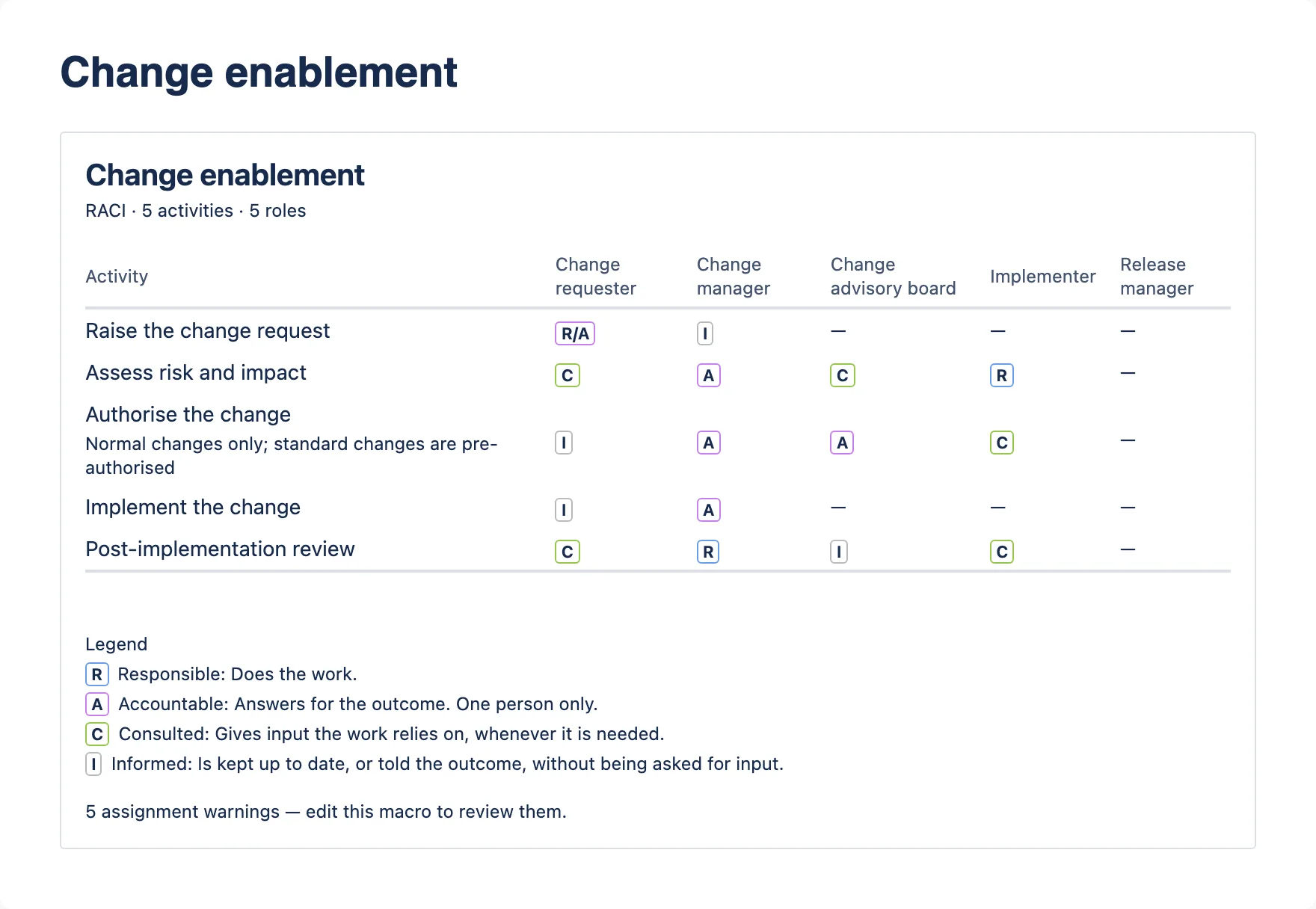
Describe this screenshot
A RACI matrix titled “Change enablement”. Under the legend, small text reads “5 assignment warnings — edit this macro to review them.”Service Review RecordRun the review, keep the record
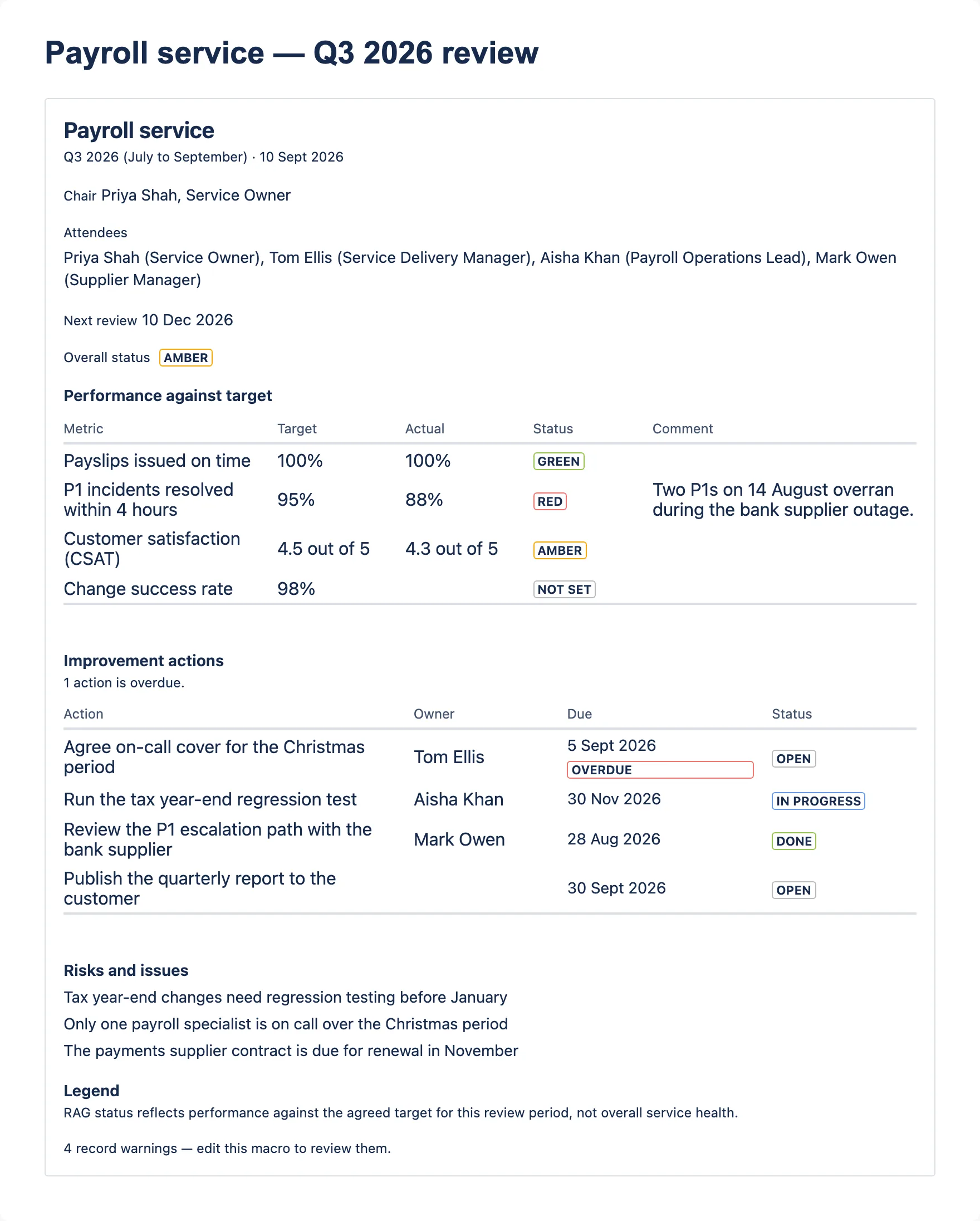
A structured service review record with RAG status, a KPI table and improvement actions that track owner, due date and status, shown as overdue against each reader’s own local date.
Describe this screenshot
A service review record headed “Payroll service”, subtitle “Q3 2026 (July to September) · 10 Sept 2026”. Chair, Attendees and Next review lines follow, then “Overall status” with an AMBER label. Under the heading “Performance against target”, a KPI table lists four metrics with Target, Actual, a coloured Status and a Comment. Under the heading “Improvement actions”, small text reads “1 action is overdue.” above an actions table in which the first action’s due date, 5 Sept 2026, is bold with a red OVERDUE label. “Risks and issues” lists three lines, a “Legend” heading introduces a sentence explaining what RAG status reflects, and small text at the foot reads “4 record warnings — edit this macro to review them.”What the author fills in
Review tab
- Service name, review period, review date and next review date.
- Chair, and attendees one per line.
- Overall status — Green, Amber, Red or Not set. It starts at Not set rather than guessing.
- Risks and issues, one per line.
- Show RAG legend.
KPIs tab
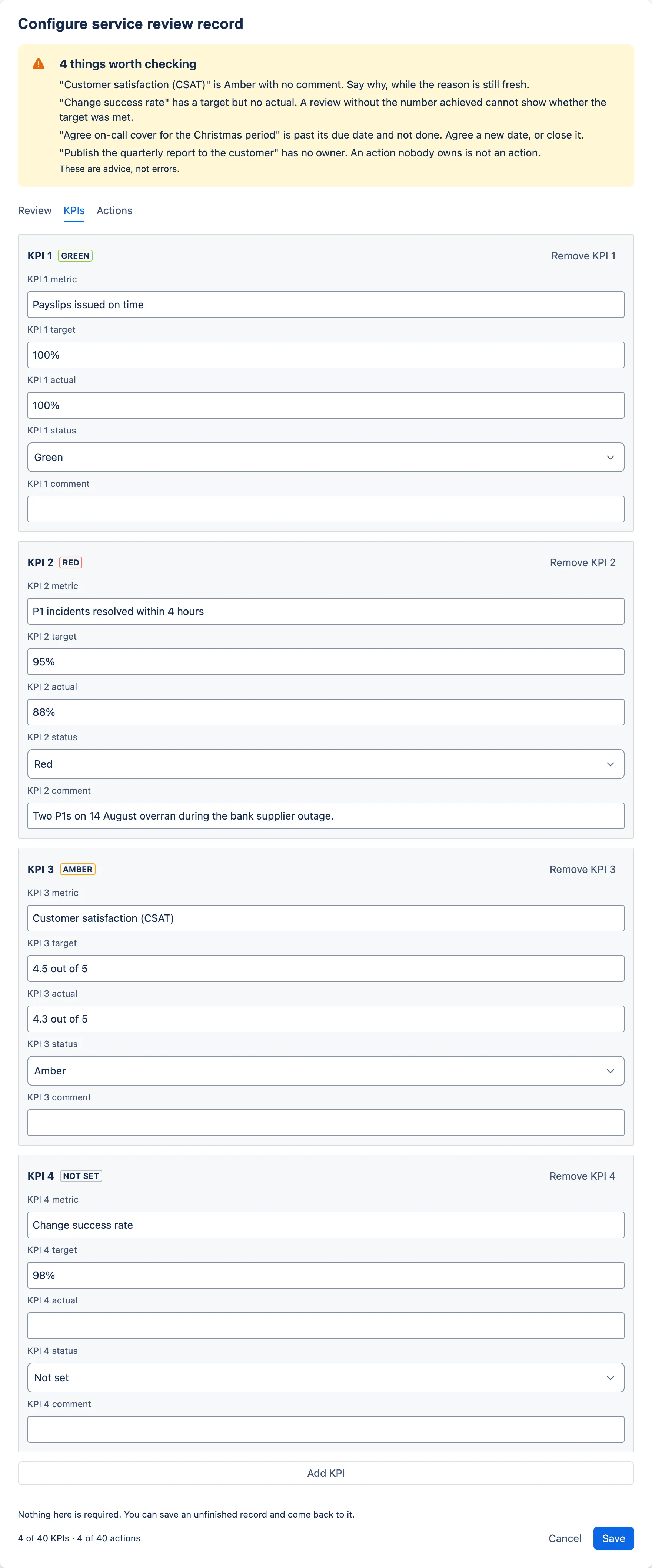
- Metric, target, actual, status and comment, per row.
- A live status label beside each row heading, so the shape of the quarter is visible while you type.
Actions tab
- Description, owner, due date and status — Open, In progress or Done.
What a reader sees
- The service name as the heading, the period and review date as the subtitle.
- Overall status as a labelled lozenge — the word as well as the colour — always shown, and reading “Not set” until someone chooses one.
- A KPI table: metric, target, actual, status, comment.
- An improvement actions table, with an overdue due date shown in bold and given its own “Overdue” label rather than just turning red.
- A count of overdue actions above the table, and risks and issues below it.
- One quiet line at the foot if the record has gaps — “4 record warnings — edit this macro to review them.”
Limits
| KPIs | up to 40 |
|---|---|
| Improvement actions | up to 40 |
| Status scale | Green, Amber, Red, Not set |
| Service, period and chair | 120 characters |
| KPI metric, target, actual, comment, action, owner | 240 characters |
| Attendees, risks and issues | 2,000 characters |
Character caps count user-perceived characters rather than code units, so a cap cannot cut an emoji in half or drop a combining mark. The field stops the typing at the limit rather than discarding the overflow when you save.
What it tells you, and never blocks you on
The exact wording, from the app’s own source. Every one of these saves anyway.
- “Change success rate” has a target but no actual. A review without the number achieved cannot show whether the target was met.
- “Customer satisfaction (CSAT)” is Amber with no comment. Say why, while the reason is still fresh.
- “Publish the quarterly report to the customer” has no owner. An action nobody owns is not an action.
- “Agree on-call cover for the Christmas period” is past its due date and not done. Agree a new date, or close it.
- KPI 3 has no metric. A KPI without one is not saved, and its target, actual and comment go with it.
- Action 4 has no description. An action without one is not saved, and its owner, due date and status go with it.
An action due today is not overdue. Every date in the app is a calendar date, never an instant, so none of them is shifted by a time zone. On the page, comparison happens against the reader’s own local calendar date — which means “overdue” means what the reader would say it means, in Sydney and in San Francisco alike, reading the same page at the same moment. One honest exception: an exported PDF is generated on Atlassian’s infrastructure and dated against its clock, not the exporting reader’s.
Describe this screenshot
The KPIs tab showing four KPI boxes: Payslips issued on time, target and actual 100%, Green; P1 incidents resolved within 4 hours, target 95%, actual 88%, Red, with a comment; Customer satisfaction (CSAT), target 4.5 out of 5, actual 4.3 out of 5, Amber, no comment; Change success rate, target 98%, no actual, Not set. Each box header shows the KPI number, a status label and a Remove button.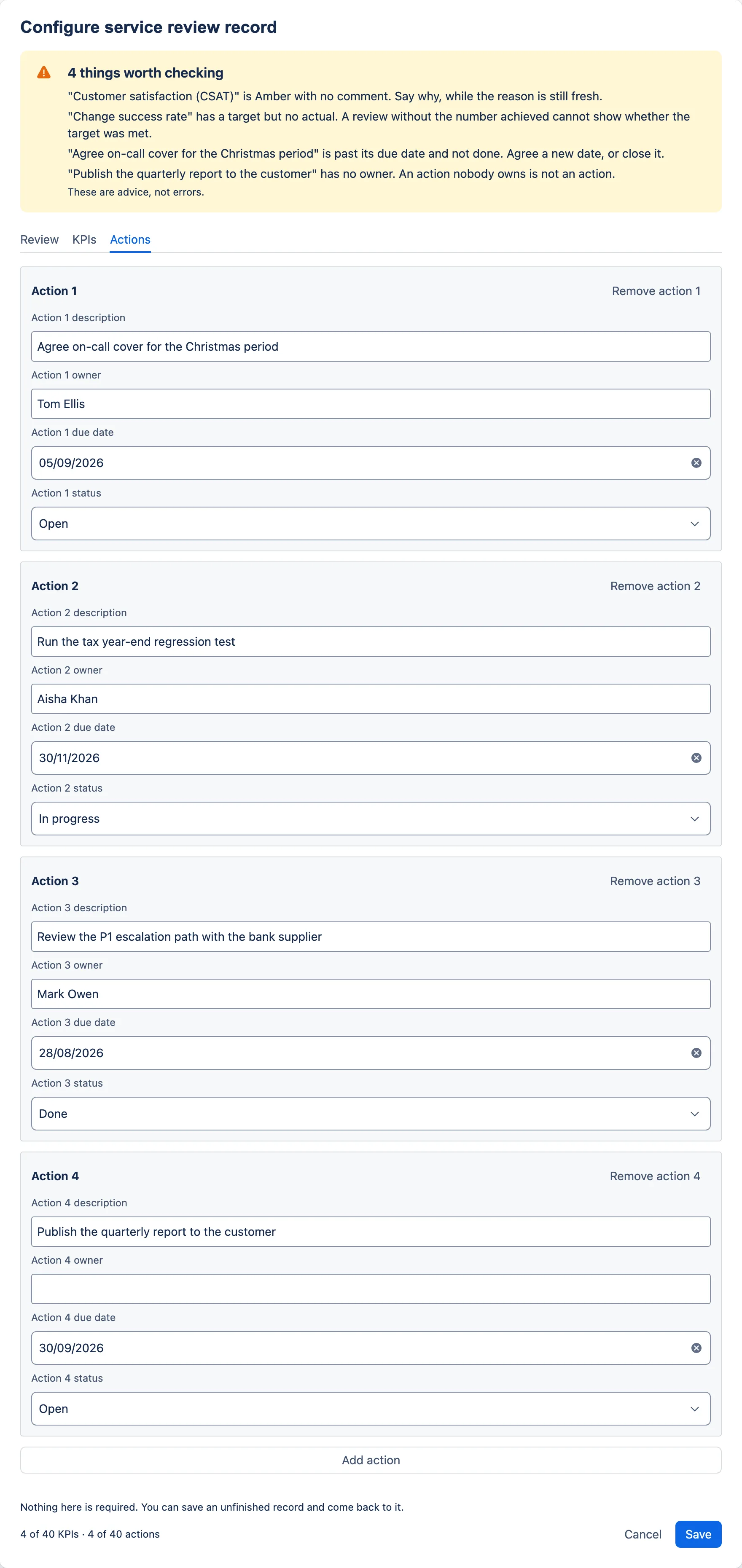
Describe this screenshot
The Actions tab showing four action boxes: Agree on-call cover for the Christmas period, Tom Ellis, due 05/09/2026, Open; Run the tax year-end regression test, Aisha Khan, due 30/11/2026, In progress; Review the P1 escalation path with the bank supplier, Mark Owen, due 28/08/2026, Done; Publish the quarterly report to the customer, no owner, due 30/09/2026, Open.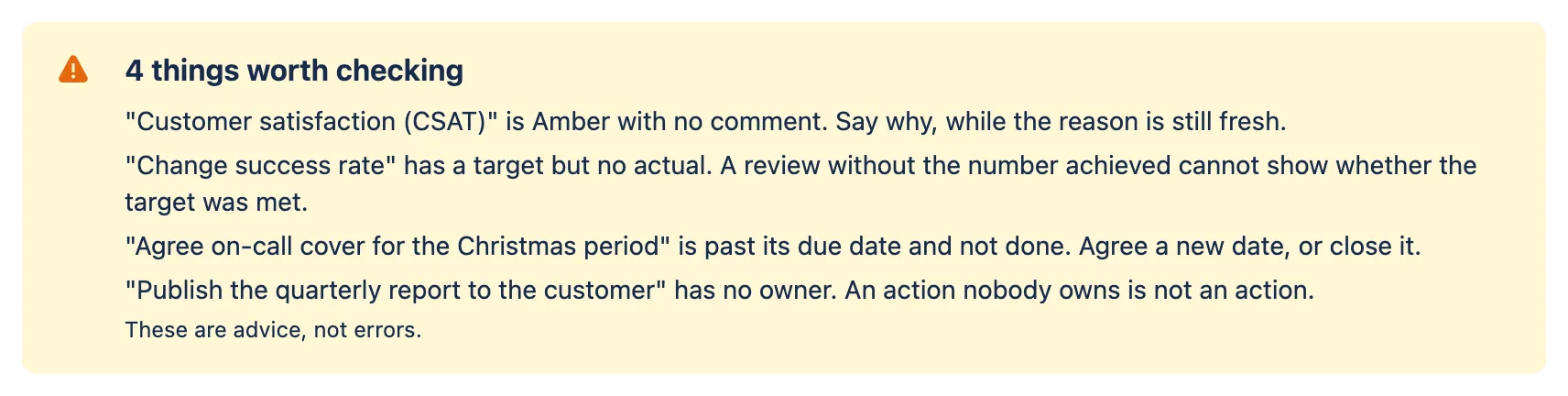
Describe this screenshot
Close-up of the warnings banner titled “4 things worth checking”, listing: “Customer satisfaction (CSAT)” is Amber with no comment; “Change success rate” has a target but no actual; “Agree on-call cover for the Christmas period” is past its due date and not done; “Publish the quarterly report to the customer” has no owner.Service Level TargetsState the target, stop the argument
Service level targets by priority, with service hours and support hours as separate fields, so what is agreed and what is disputed are no longer the same conversation.
Describe this screenshot
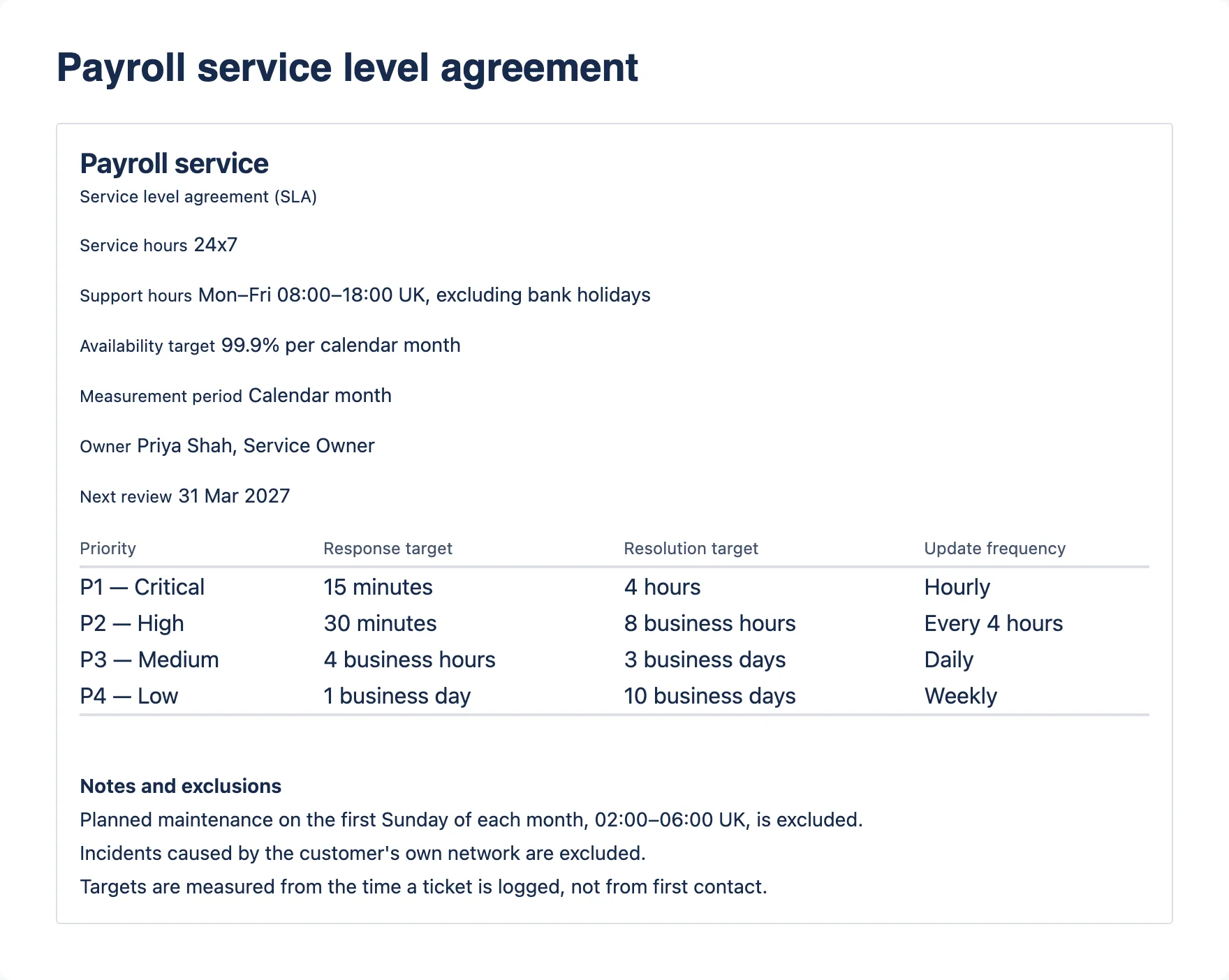
A service level targets macro headed “Payroll service”, subtitle “Service level agreement (SLA)”. Detail lines show Service hours 24x7, Support hours Mon–Fri 08:00–18:00 UK excluding bank holidays, Availability target 99.9% per calendar month, Measurement period, Owner and Next review 31 Mar 2027. A targets table lists P1 — Critical to P4 — Low with response, resolution and update frequency. Three notes and exclusions follow, including planned maintenance and when targets are measured from.What the author fills in
Service tab
- Service name.
- Agreement type — service level agreement (SLA), operational level agreement (OLA) or underpinning contract.
- Service hours, for example “24x7”.
- Support hours — when the support team is staffed. Fill this in whenever a target runs in business hours or business days, because those targets pause outside it.
- Owner, and the date the agreement is next due for review.
Targets tab
- Priority, response target, resolution target and an optional update frequency, per row.
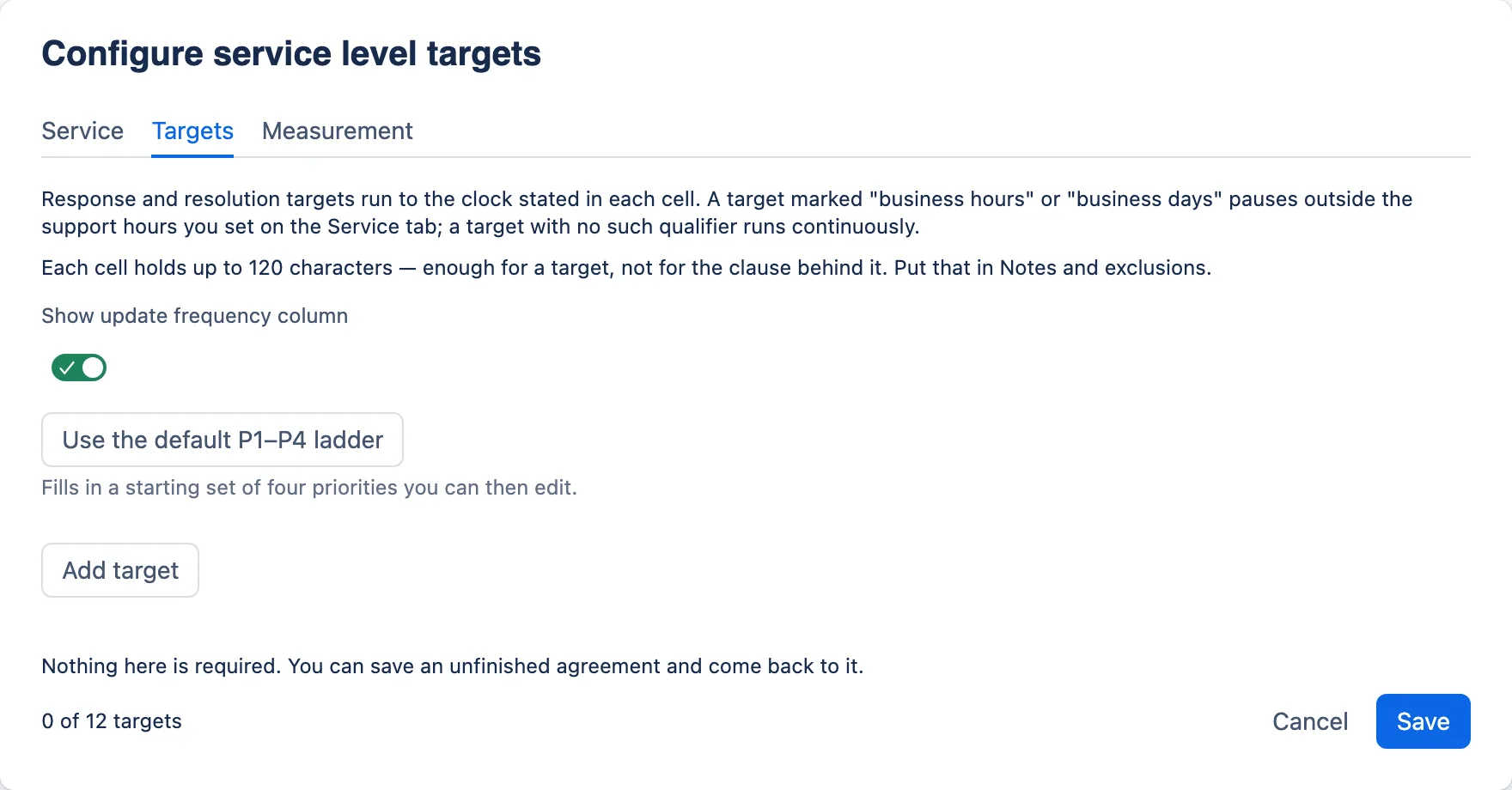
- A “Use the default P1–P4 ladder” button that fills in a starting set you can then edit.
- A toggle for the update frequency column. Switch it off and the values are kept, saved, and counted back to you.
Measurement tab
- Availability target, for example “99.9% per calendar month”.
- Measurement period.
- Notes and exclusions, one point per line.
- Compact view, which hides the owner, review date, measurement period and notes on the published page.
What a reader sees
- The service name as the heading, and the agreement type spelled out as the subtitle.
- Service hours, support hours and the availability target — kept even in compact view, and each shown when it has a value.
- The targets table, with three or four columns depending on the update frequency toggle.
- Measurement period, owner, next review and the notes — unless compact view is on.
- One quiet line at the foot if the targets have gaps — “3 warnings — edit this macro to review them.”
Limits
| Priority targets | up to 12 |
|---|---|
| Agreement types | SLA, OLA, underpinning contract |
| Starting ladder | editable P1–P4 |
| Service, hours, owner, availability, measurement period | 120 characters |
| Each cell of the targets table | 120 characters |
| Notes and exclusions | 2,000 characters |
Character caps count user-perceived characters rather than code units, so a cap cannot cut an emoji in half or drop a combining mark. The field stops the typing at the limit rather than discarding the overflow when you save.
What it tells you, and never blocks you on
The exact wording, from the app’s own source. Every one of these saves anyway.
- “P5 — Planned work” has neither a response nor a resolution target. A priority with no time against it commits to nothing.
- “P2 — High” is used for more than one target. A reader cannot tell which one applies.
- The update frequency column is switched on but no target has one, so it renders as an empty column. Fill one in, or switch the column off.
- Target 3 has no priority. A target without one is not saved, and its response and resolution targets go with it.
A stated convention, not an enforced one. The editor tells the author, in the form: a target marked “business hours” or “business days” pauses outside the support hours set on the Service tab, and a target with no such qualifier runs continuously. Which clock a target runs to is exactly the kind of thing that gets argued about after the fact.
The macro records what you type. It does not measure anything, pause anything or raise an alert, and the convention is stated to the author rather than printed for the reader. Its job is to make two people writing the same table write cells that mean the same thing.
This macro is the targets table of an agreement, not the agreement. There are no parties, no signatories, no approval date, no version and no service credits, because those belong in the page around it. The service level manager’s guide says where to put each of them.
The starting ladder
One button fills this in. Every cell is editable — not every organisation uses P1–P4.
| Priority | Response | Resolution | Update frequency |
|---|---|---|---|
| P1 — Critical | 15 minutes | 4 hours | Hourly |
| P2 — High | 30 minutes | 8 business hours | Every 4 hours |
| P3 — Medium | 4 business hours | 3 business days | Daily |
| P4 — Low | 1 business day | 10 business days | Weekly |
Describe this screenshot
The Targets tab with no targets yet: the clock-basis text, the Show update frequency column toggle switched on, a “Use the default P1–P4 ladder” button with the helper “Fills in a starting set of four priorities you can then edit.”, an Add target button, and 0 of 12 targets in the footer.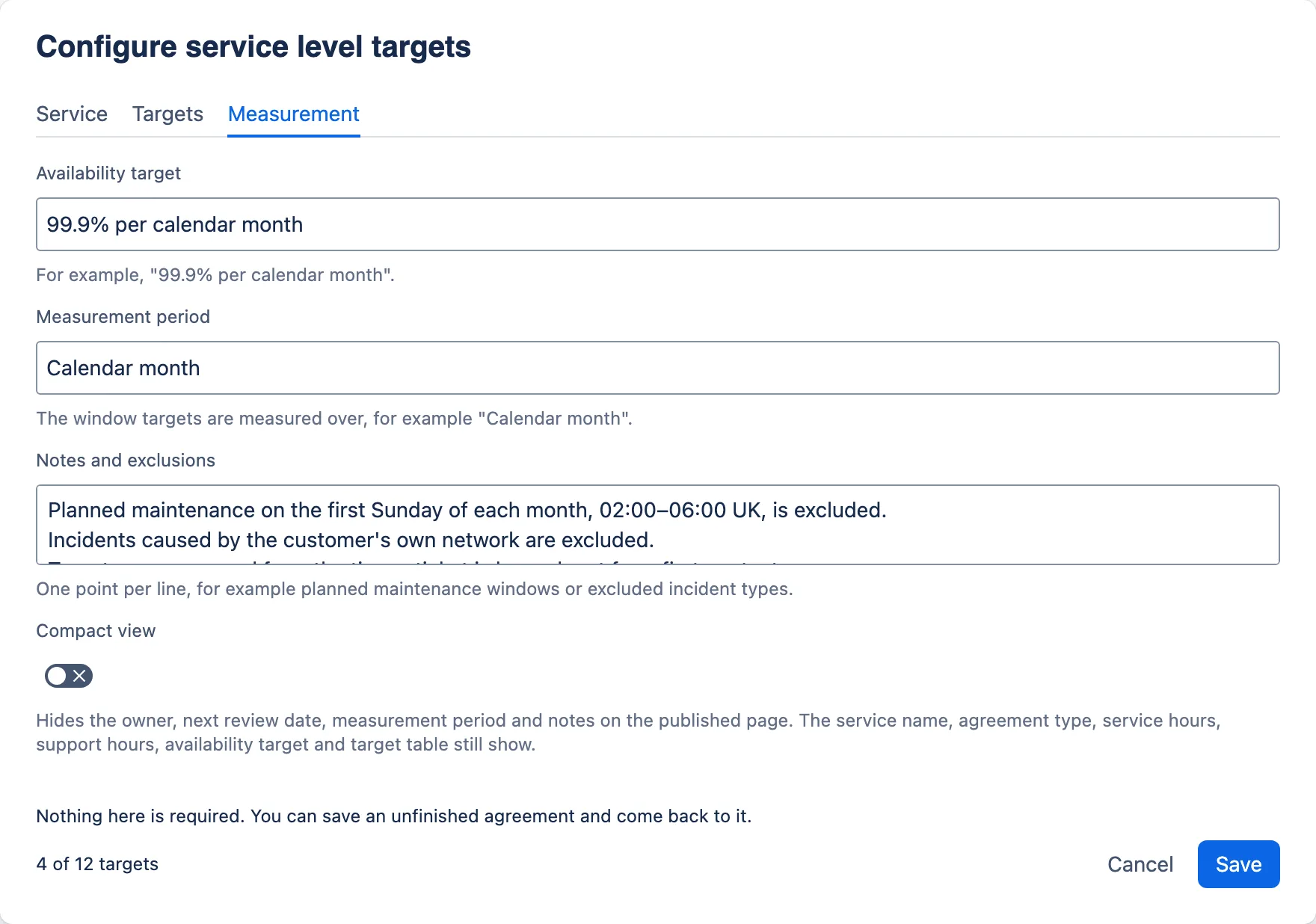
Describe this screenshot
The Measurement tab: Availability target “99.9% per calendar month”, Measurement period “Calendar month”, a Notes and exclusions text area holding lines about planned maintenance and incidents caused by the customer's own network, and the Compact view toggle switched off with its helper text.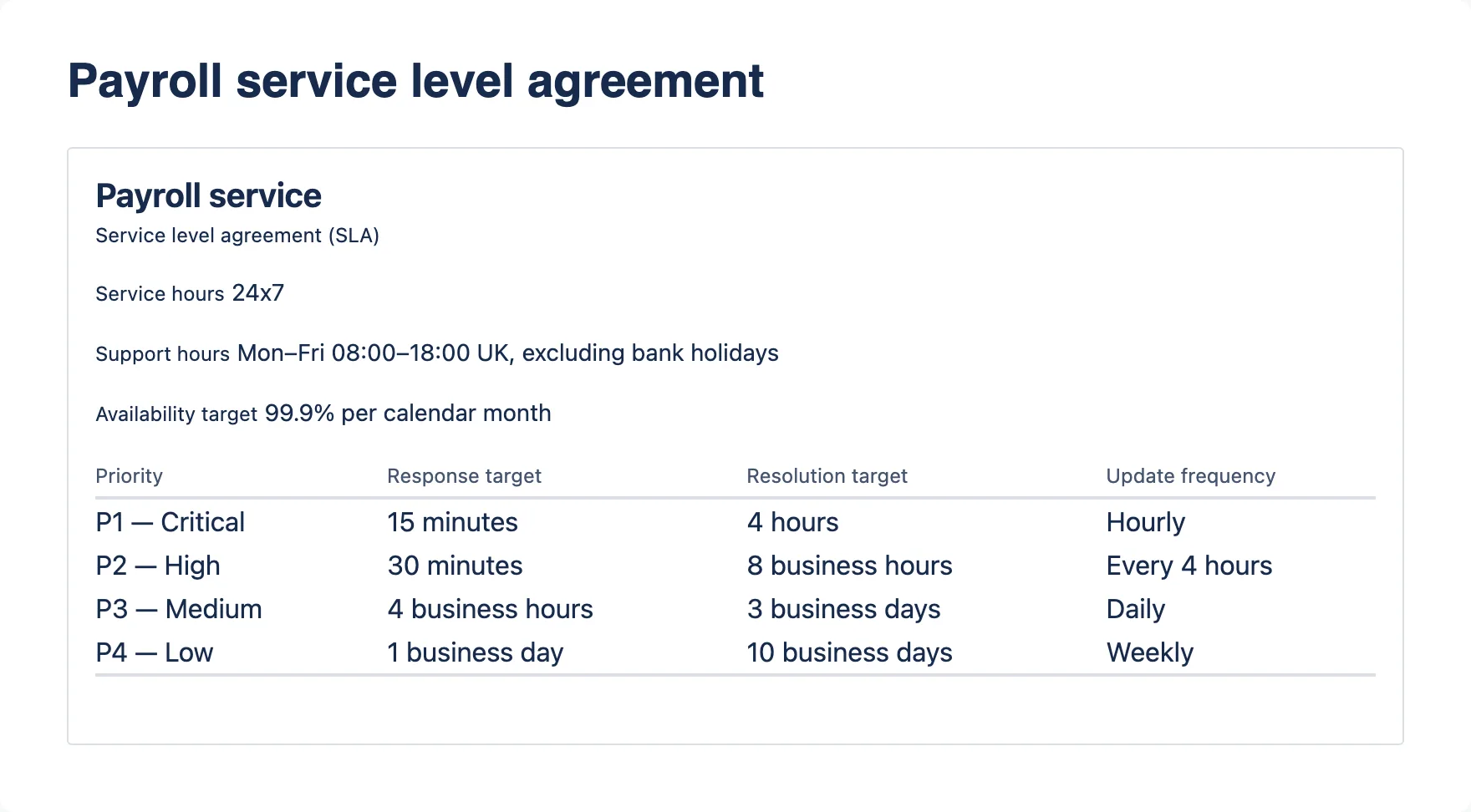
Describe this screenshot
The same Payroll service SLA in compact view: heading, Service level agreement (SLA), Service hours, Support hours and Availability target, then the full targets table. No measurement period, owner, next review or notes.The same behaviour, whichever macro you insert.
A calm empty state
Until it is configured, a macro is a quiet bordered panel with its name and a hint. Deliberately calm: this is the normal first state of every macro, not an error.
Nothing is required
Every dialog saves an unfinished record. A half-filled RACI from a workshop, or a review typed live in the meeting, is the normal case rather than the exception.
Closing keeps your work
Confluence closes a configuration dialog on Esc or its own × without asking the app, so the app saves what you typed rather than lose it. Only Cancel, then Discard changes, throws work away. A configuration that could not be read is never saved over.
Honest about newer versions
Open a macro saved by a newer version of the app — after a rollback, say — and the dialog tells you: “Saved by a newer version of this app”. You can still save, knowing that what the newer version added will not be kept.
Warnings above the tabs, never in your way
A banner lists what looks unfinished before you reach the fields, so a screen reader meets it on entry. Eight are shown at a time, with a “Show all” expander behind the rest. In the RACI matrix the first warning about each activity or role also carries a button that switches tab and selects the exact row; the other two name the row in the message.
Confirmations that count what you lose
Removing a row asks only when there is work to lose, says exactly how much, and puts the safe button first with the focus on it. While the question is open, that row’s fields are locked, so what you confirm is what goes.
Light and dark
Every colour, space and radius is an Atlassian design token, so the macros follow the reader’s Confluence theme without the app knowing which one is in use.
Real tables in PDF and Word
The view and the export are generated from the same model, so an exported record cannot drift from the one on the page. Header cells are real header cells, so assistive technology and the Word exporter both treat them as headers. Dates are written day-first (“27 Sept 2026”), and a RACI matrix whose role names cannot fit a portrait page whole is headed with the roles’ initials, with a Roles key above the table.

Describe this screenshot
A plain grey box with the bold title “RACI Matrix” and the line “Edit this macro to add the roles and activities you want to map.”
Describe this screenshot
A plain grey box with the bold title “Service Review Record” and the line “Edit this macro to record the service, review period and outcomes.”
Describe this screenshot
A plain grey box with the bold title “Service Level Targets” and the line “Edit this macro to record the service, its agreement type and its targets.”Readable at phone width. Here is exactly what that looks like.
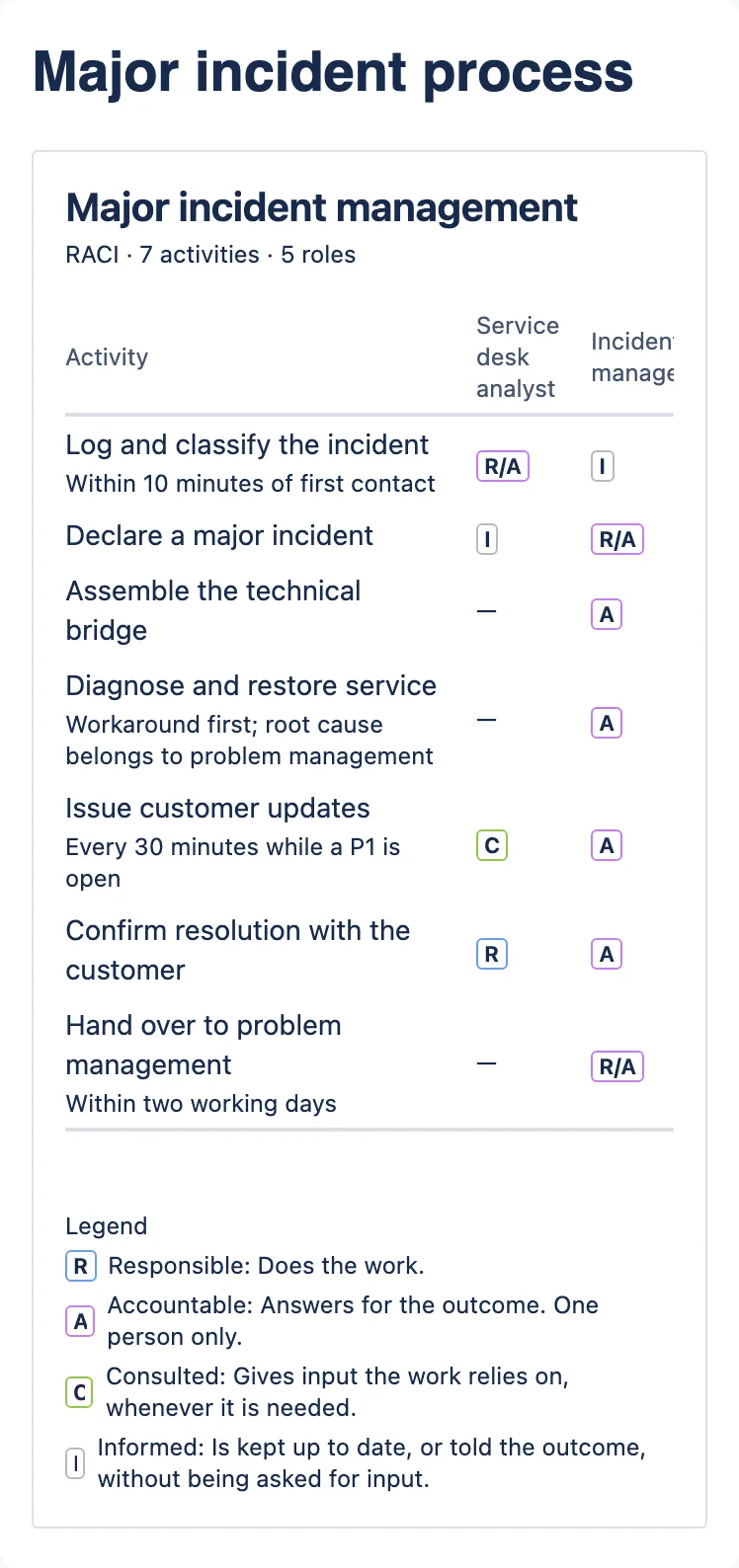
A wide matrix scrolls inside the macro rather than stretching the page. At 390 pixels the Activity column keeps whole words and the role columns scroll sideways, as the screenshot shows, so a reader scrolls to see every role. Reading is supported on mobile. Editing is a desktop job.
Describe this screenshot
A RACI matrix at phone width. The activity column keeps whole words — “Log and classify the incident”, “Assemble the technical bridge” — and only the first role column and part of the second are in view; the rest scroll sideways inside the macro. The legend below wraps onto more lines.“ITIL-aligned” is a claim. These are the three things behind it.
No endorsement is claimed and none exists. What follows is what the macros actually do that a practitioner would recognise.
The caveat that keeps a green quarter honest
A Service Review Record renders this under the table: “RAG status reflects performance against the agreed target for this review period, not overall service health.” It is the distinction that stops a green quarter being read as a healthy service, and it is on the page rather than in the training. It is on by default, and controlled by the Show RAG legend toggle, so an author can switch it off.
The underpinning agreement is allowed to be tighter
The macro models SLA, OLA and underpinning contract as separate documents, which is what lets an OLA at 99.95% sit correctly underneath an SLA at 99.9%. An agreement that cannot be stricter than the one it supports is not an agreement, it is a copy.
An improvement register, one slice at a time
Improvement actions carry an owner, a due date and a status, per review, on the service’s own page. That is the local slice of the improvement register ITIL 4 continual improvement and ISO/IEC 20000 service reporting both expect — kept where the evidence for it already is.
You could do all three in a Confluence table.
So the question is not whether a table works. It is what a table cannot do, and what you give up to get that. Here is the scorecard, both columns.
| What you need it to do | A Confluence table | These macros |
|---|---|---|
| Tells you two roles are accountable for the same activity | No | Yes, in the dialog, without blocking the save |
| Tells you an action has no owner, or is past its date | No | Yes, judged against the reader’s own local date |
| Starts from a worked example for your practice | No | Yes — 34 practice templates for the RACI Matrix, each yours to edit |
| Keeps its shape | Whatever is left in it after a year of edits | Fields are fields. Nobody can quietly delete the support hours row |
| Exports as the same thing it renders | Whatever the exporter makes of it | The view and the export come from one model, so they cannot drift |
| Comparable quarter to quarter | Only if everyone uses the same headings | The structure is the same every time by construction |
| Found by Confluence search | Yes | No — macro content is not indexed |
| Editable on a phone | Yes | No — reading is fine, editing is a desktop job |
| Needs a vendor, an install and a security review | No | Yes, though the review is short |
| Survives the vendor disappearing | Always | The data does. The rendering eventually would not |
If your honest answer is “one RACI, one page, one team” — use a table. The macros earn their place when the same record has to be made repeatedly, by different people, and then held up as evidence.
What it does not do.
Everything below is a real limit of version 1.0, with the reason it exists. None of it is a placeholder for something arriving shortly.
| Limit | Why |
|---|---|
| No cross-page reporting | Each macro instance stands alone; there is no roll-up of every RACI in a space. Reading other pages would require a permission the app deliberately does not request. |
| Configuration dialogs are built for a desktop screen | The rendered macros are responsive and read well on the Confluence mobile app. Editing them is not a phone task. |
| Exports depend on Confluence’s own export handler | The macros supply well-formed content, sized for a portrait page: an export cannot choose the page size or orientation, so a RACI matrix too wide for its role names is headed with initials and a Roles key rather than squeezed. How the PDF or Word file lays that content out is Confluence’s rendering. Declaring an export handler also replaces Confluence’s higher-fidelity PDF path with the renderer Word uses — a deliberate trade, because a real table in both beats a polished image in one. Atlassian also warns that a great many macro instances can drive a large number of invocations in a single export, which can hit rate limits: a very large review pack could export slowly or incompletely. |
| No import | You cannot paste a RACI in from a spreadsheet in this version. |
| Not indexed in Confluence search | Macro configuration is not opted into the search index, so text inside a macro is not expected to appear in search results — including a search for a person’s name that ought to find a review record naming them. This has not yet been verified against a live site. |
| A macro title is always a level-three heading | The UI Kit components the macros are built from do not expose a way to change it. |
Three records, on the page the service already lives on.
One install by a site administrator, then nothing: no app permission to manage, no accounts to create, no licence to renew, and no change in cost at any number of users.
Not listed yet: it goes to the Atlassian Marketplace as a free app once it has passed review. The button opens your own mail client. You hear once, on the day it lists, and never again. What is in 2.7.0
Need this shaped to your organisation — the practices, the roles, the reporting line? That is what ITSM Ltd does for a living.